How to Protect Customer Data in a Small Business (2026 Guide)
Your customers trust you with their names, their email addresses, their payment details, and sometimes even more sensitive information. That trust is fragile. One slip, one overlooked setting, one employee who clicks the wrong link, and that trust shatters. In 2026, the pressure to protect customer data has only intensified. New privacy laws have teeth. Hackers have sharper tools. And your clients are more aware than ever about how their information gets handled. The good news is that protecting customer data does not require a Silicon Valley budget. It requires a clear plan, a handful of consistent habits, and a genuine commitment to treating data with the same care you would want for your own personal details. I am going to walk you through exactly what that looks like. No jargon, no scare tactics, just the real steps that keep your customers safe and your business reputation intact.
Know Exactly What Customer Data You Hold
Before you can protect something, you have to know it exists. This sounds obvious, but you would be amazed how many small businesses collect data they forgot about years ago. Old spreadsheets with client birthdays, email lists from a trade show that happened before the pandemic, scanned copies of driver’s licenses sitting in a folder nobody opens. All of it is customer data. All of it needs protection. The first step is a thorough, honest inventory. Walk through every corner of your digital and physical space and ask yourself what personal information lives there.
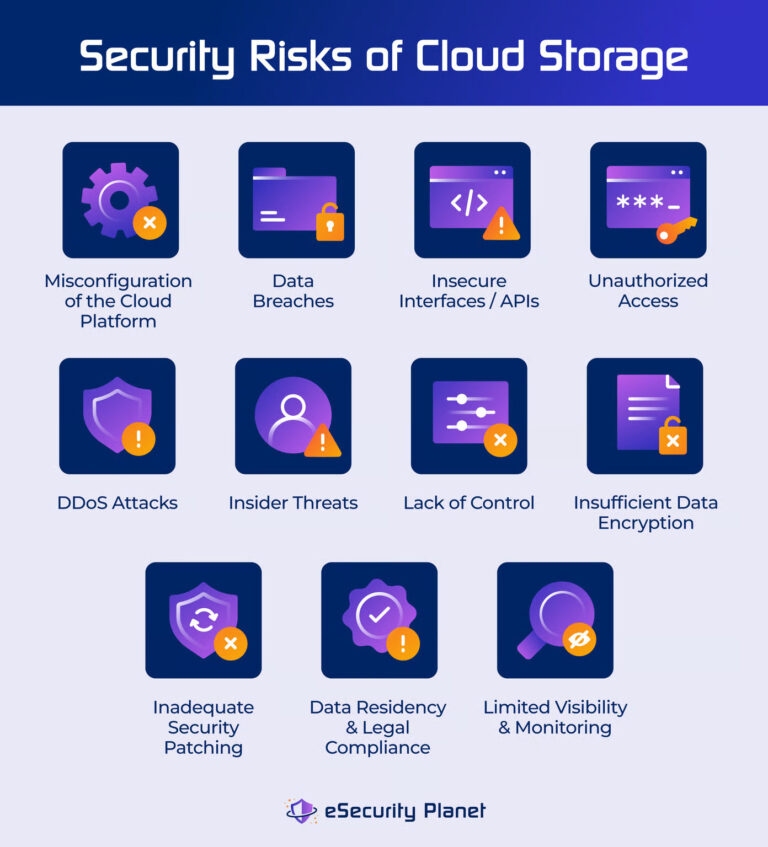
Your email inbox alone probably contains a mountain of data. Contract attachments, invoices with home addresses, support tickets where customers sent photos of their IDs. Cloud storage is another goldmine. Shared drives, old backup folders, that zip file your bookkeeper sent three years ago. Even your point-of-sale system holds transaction histories tied to names and card details. Make a list. Write down every location where customer information sits. This inventory might feel tedious, but it gives you clarity. You cannot defend what you do not know you have. And in 2026, regulators expect you to know.
The Forgotten Places Data Hides
Think beyond the obvious. Do you have a physical filing cabinet with old paper forms? A shredding bin that has not been emptied in months? A copier that stores scans on an internal hard drive? These are all part of your data map. I spoke with a small accounting firm recently that discovered their office printer had saved copies of every tax return they had processed over five years. They had no idea until the printer needed repairs. Stories like this are common. Walk your office with fresh eyes. Check every device that touches customer information. The inventory is the foundation everything else rests on.
Understand the 2026 Regulatory Landscape
Privacy laws have evolved fast. If you have not checked the rules lately, the landscape might look different than you remember. In 2026, protecting customer data is not just good business. It is a legal obligation with real financial consequences. The specific requirements depend on where your customers live, not just where your business operates. You can be a small shop in a small town and still need to comply with regulations from states or countries thousands of miles away if you handle data from people who live there. It sounds unfair, but it is the reality of the digital economy.
The key regulations you are likely to encounter include the General Data Protection Regulation if you have any European customers, the California Consumer Privacy Act and its newer amendments if you handle California residents, and a growing patchwork of state-level laws in places like Virginia, Colorado, and Connecticut. Each of these gives individuals rights over their data. The right to know what you hold, the right to ask you to delete it, the right to correct mistakes. Your business needs a process to handle those requests. Even if a customer never asks, having the process in place protects you during an audit or a complaint.
What Regulators Actually Expect from Small Businesses
Regulators understand that a five-person team cannot do what a bank does. They expect reasonable measures, not perfection. Document your efforts. That is the magic word. Write down your data inventory, your security practices, and your breach response plan. If something goes wrong and a regulator comes asking questions, your documentation shows good faith. That can mean the difference between a warning and a significant fine. In 2026, fines for mishandling customer data can climb into the tens of thousands even for small businesses. The documentation is your shield. It proves you cared and you tried.
Collect Only What You Truly Need
One of the simplest and most powerful ways to protect customer data is to not have it in the first place. Every piece of information you collect is a piece you could lose. So ask yourself, do you really need a customer’s full date of birth, or would just the year suffice? Do you need to store their credit card number, or can your payment processor handle that for you? The principle of data minimization is your friend. Collect less, store less, worry less. It is that straightforward.
Look at your intake forms, your online checkout, your client questionnaires. If a field is not absolutely necessary for the service you provide, remove it. This feels countercultural in a world that encourages hoarding data for future marketing. But the risk has shifted. Holding onto extra data is no longer free. It increases your liability. A breach that exposes five hundred email addresses is bad. A breach that exposes those same emails plus phone numbers, birth dates, and purchase histories is catastrophic. Slash the unnecessary fields. Your customers will not miss them, and your security posture will improve immediately.
Payment Data Deserves Special Attention
If you handle payment card information, the rules are even stricter. The Payment Card Industry Data Security Standard applies regardless of your size. But here is the good news. Most small businesses can avoid the heaviest burdens entirely by never touching card data directly. Use a reputable payment gateway that tokenizes transactions. The customer enters their card details on a hosted page controlled by the processor, and you never see the full number. This approach slashes your compliance scope and removes a massive target from your systems. If you absolutely must store card data, which I strongly discourage, you need a qualified security assessor involved. For nearly all small businesses, the smarter path is to let the professionals handle it.
Lock Down Access to Customer Information
Not everyone in your business needs access to everything. The receptionist probably does not need to see client financial records. The summer intern definitely does not need administrative privileges on your customer database. Access control is about limiting who can touch what. The principle of least privilege means each person gets only the access required for their specific job. Setting this up takes an afternoon of configuration in your cloud platforms and internal systems. The payoff is enormous because it shrinks the number of people who could accidentally expose data or whose accounts could be compromised and used to steal it.
Start with your most sensitive data stores. Your customer relationship manager, your accounting software, your cloud storage. In each platform, create roles with defined permissions. A salesperson might need to view and edit customer contact details but not download the entire list. A contractor might need read-only access for a limited time. Regularly audit these permissions, especially when someone changes roles or leaves the company. Offboarding is not just collecting a key card. It is revoking every digital login immediately. I have heard too many stories about ex-employees who still had access months after departure because nobody thought to check.
The Shared Account Problem
Shared logins are a security nightmare. When everyone uses the same username and password to access a customer database, you lose all ability to track who did what. If data gets deleted or leaked, you cannot trace it. Worse, if that single password gets breached, the attacker has the keys to the kingdom. Phase out shared accounts wherever possible. Create individual logins for each team member. Most business software now supports this without extra cost. It takes a little setup time, but the accountability and security it provides are well worth it.
Use Encryption Everywhere It Makes Sense
Encryption sounds intimidating, but the concept is simple. It scrambles data so that only someone with the right key can read it. If a laptop gets stolen or a cloud account gets breached, encrypted data is just useless gibberish to the thief. You should encrypt customer data in two states. At rest, meaning when it is sitting on a hard drive or in cloud storage, and in transit, meaning when it is moving across the internet. Most modern services handle in-transit encryption automatically through HTTPS. That is the little padlock in your browser. Make sure your website and any portals you use have that padlock.
For data at rest, the situation requires a bit more attention. Full-disk encryption on company laptops and desktops is a must. Tools like BitLocker on Windows and FileVault on Mac are free and built in. Turn them on. It takes a few minutes and protects every file on the machine. If a device is lost or stolen, the data stays locked. Cloud storage platforms also offer encryption, but read the fine print. Some hold the encryption keys themselves, which means they could theoretically access your data. Others offer zero-knowledge encryption where only you hold the key. For highly sensitive customer files, that extra layer is worth considering.
Train Your Team Like Your Business Depends on It
Your employees are your front line. They answer emails, take phone calls, and handle the day-to-day interactions that involve customer data. A single moment of distraction can undo months of careful security work. Training is not a one-and-done event. It is an ongoing conversation. Start with the basics. Teach your team how to spot a phishing email. Show them real examples. Explain that no legitimate organization will ever ask for a password or a credit card number via email. Make it safe for them to report mistakes. If someone clicks a bad link, you want them to tell you immediately, not hide it out of embarrassment.
Then move into your specific data handling procedures. Walk through exactly how customer files should be stored, shared, and eventually deleted. Role-play a customer asking for their data to be deleted under a privacy law. Make sure everyone knows the steps to follow. Training that is grounded in real scenarios sticks better than a list of abstract rules. Keep sessions short and informal. A fifteen-minute chat at a team meeting every quarter is far more effective than a three-hour lecture nobody remembers. Celebrate when someone catches a phishing attempt. Positive reinforcement builds a culture where security feels like a shared mission rather than a burden.
The Special Risks of Remote and Hybrid Work
If your team works from home, customer data protection gets trickier. Home networks are often less secure. Family members might glance at screens. Work devices mix with personal browsing. Your policy needs to address this reality head-on. Require that company laptops use a virtual private network when accessing customer data from public Wi-Fi. Encourage employees to set up a separate work profile on their home computers if they use personal devices. Provide privacy screens for laptops so that prying eyes in a coffee shop see only darkness. These small adjustments recognize that the boundary between office and home has blurred and adapt your protections accordingly.

Secure Physical Records and Devices
Not all customer data lives in the cloud. Paper forms, printed contracts, old hard drives, and discarded USB sticks all pose risks. A file folder left on a desk in a shared office space is just as exposed as an unencrypted database. Develop simple habits around physical security. Lock filing cabinets containing sensitive documents at the end of the day. Keep a shredder nearby and use it for anything with personal information that is no longer needed. A cross-cut shredder is inexpensive and does the job well.
Old devices need special handling before they leave your possession. Simply deleting files is not enough. Data can be recovered with free software. Use a wiping tool that overwrites the entire drive multiple times. For devices that are truly at end of life, physical destruction is the surest path. Many electronics recyclers offer certificates of destruction for hard drives. That certificate is another piece of documentation that proves you took reasonable steps. The same goes for old photocopiers and printers with internal storage. Factory reset them before disposal. These physical security steps do not require technical expertise, just a bit of diligence and a checklist.
Vet Your Vendors and Third Parties
You probably share customer data with other companies without even thinking about it. Your email marketing platform, your cloud accounting software, your payment processor, your website hosting provider. Each of these vendors becomes a potential leak point. In 2026, regulators hold you responsible for the vendors you choose. If your email provider gets breached and your customer list gets exposed, you are the one facing angry clients and potential fines. So you need to vet who you trust.
Before signing up for a new service that will touch customer data, ask a few simple questions. Do they have a published security page or a trust center? Do they support multi-factor authentication? Do they encrypt data at rest? What is their breach notification policy? A reputable vendor will answer these questions openly. If they dodge or offer vague reassurances, consider that a red flag. Include data protection terms in your contracts. Specify that the vendor must notify you within a certain timeframe if a breach occurs. These clauses are not just legal boilerplate. They are practical tools that give you recourse and keep your customers informed promptly.
Plan Your Response Before an Incident Happens
Even with all these protections, a breach can still happen. A crafty phishing email, a zero-day vulnerability, a lost laptop. The difference between a manageable incident and a business-ending crisis often comes down to how quickly and calmly you respond. A plan turns panic into action. Write down the steps you will take if customer data is exposed. Who needs to be notified internally? Who contacts the insurance carrier? Who speaks to affected customers? Having these answers ready saves hours of frantic deliberation when every minute counts.
Your plan should include a clear communication template for notifying customers. Do not hide behind corporate-speak. Be honest about what happened, what data was involved, and what you are doing about it. Offer concrete support, like credit monitoring services if financial data was compromised. Many cyber insurance policies include access to breach coaches and notification services. Know how to trigger those resources. Test your plan with a tabletop exercise once a year. Gather your team, present a fictional scenario, and walk through the response. It feels awkward the first time, but it builds muscle memory. When a real incident hits, the path feels familiar instead of terrifying.
Build a Culture of Transparency with Your Customers
Beyond the technical controls and legal compliance, there is a relationship dimension to protecting customer data. People want to know that you care. They notice when you make privacy a visible part of your business. Publish a simple privacy policy on your website. Not a dense legal document that only a lawyer could love, but an honest page written in plain language that explains what you collect, why you collect it, and how you protect it. Update it regularly. Mention your security practices in client onboarding materials. These gestures signal respect. They tell your customers that their data is not just a resource to be mined.
When a customer exercises their rights under a privacy law and asks to see or delete their data, treat that request as an opportunity, not an annoyance. Respond promptly and courteously. The experience will stick with them. In a world where giant corporations treat personal data as a commodity, a small business that handles information with genuine care stands out. That reputation for trustworthiness is a competitive advantage. It brings repeat business and word-of-mouth referrals that no amount of advertising can buy.
Conclusion
Protecting customer data in 2026 is not about chasing the latest technology or building a fortress. It is about a series of thoughtful, consistent choices. Know what data you hold and why. Collect only what you truly need. Limit who can access it. Encrypt it. Train your team to treat it with care. Secure the physical world as well as the digital one. Choose your vendors wisely and have a clear plan for when things go wrong. Above all, be transparent with the people whose data you hold.
None of this requires a degree in cybersecurity. It requires attention and follow-through. The small business that does these things is not the easy target. It is the one that attackers skip because there are softer targets down the street. Your customers sleep better knowing their information is in careful hands. You sleep better knowing you have built a shield around the trust they placed in you. Start with one step today. The inventory, the training session, the privacy policy update. Each action moves you closer to a business that not only survives in the digital age but earns the kind of loyalty that money cannot buy. That is the real payoff of protecting customer data. It is not just about avoiding fines or breaches. It is about building a company people believe in.