What Is Phishing and How to Stop It from Hitting Your Business
Phishing is the digital version of a con artist talking their way past your defenses. Someone sends a message that looks trustworthy, something that feels familiar and urgent, and the next thing you know, your money or your data is gone. The word itself is a play on fishing. Attackers cast a line with tempting bait and wait for someone to bite. The bait is usually an email, a text message, or a phone call that impersonates a person or company you trust. The goal is to trick you into handing over passwords, bank details, or access to your systems. It is the most common way cyberattacks start, and small businesses are squarely in the crosshairs. The good news is that you can build a defense that works, without a huge budget or a technical background. I want to walk you through what phishing really looks like today, how it hits small businesses, and the exact steps that stop it cold.
The Anatomy of a Phishing Attack
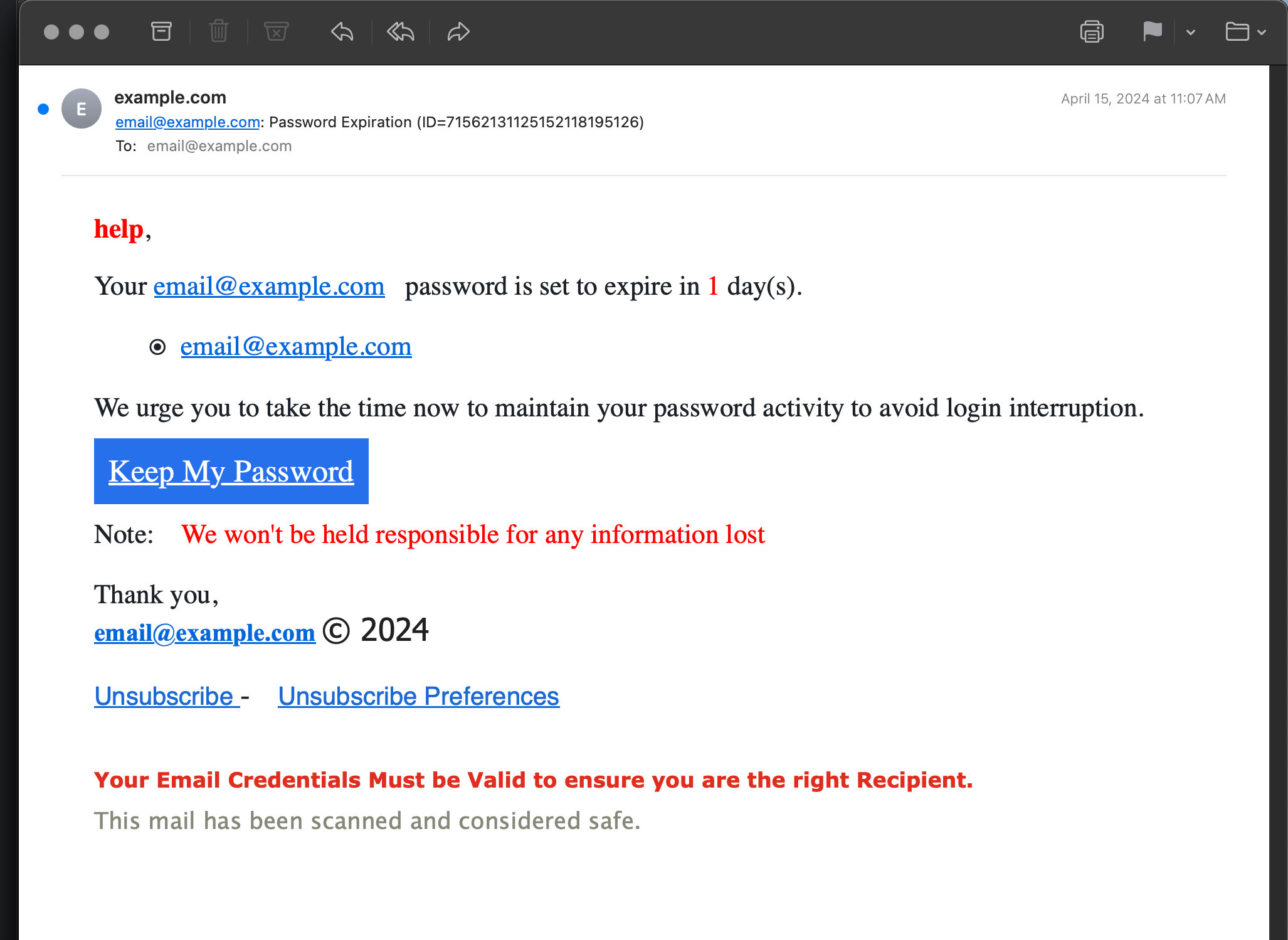
A phishing message has three jobs. It needs to look legitimate, create an emotional reaction, and push you to act before you think. That is the formula. The attacker studies you or your business enough to craft a message that blends in with your daily inbox. They might use your boss’s name, a vendor’s logo, or a fake invoice that looks just like the real thing. Then they crank up the pressure. A threat of account suspension, a time-sensitive payment request, a tempting offer that expires in an hour. The emotion overrides your rational brain, and you click the link or open the attachment without pausing to inspect it. The whole thing happens in seconds, and that is the point. These attacks are not about hacking code. They are about hacking human nature.
The link in that message leads to a fake login page that captures your credentials. The attachment installs malware that quietly steals data or locks up your files. Sometimes the attacker simply asks for a gift card or a wire transfer and waits for a busy employee to comply. The variations are endless, but the core mechanism stays the same. Deception plus urgency equals a compromised business. I have seen a small real estate firm lose a fifty-thousand-dollar earnest money deposit because someone sent a last-minute email changing the wire instructions. It looked exactly like the title company’s email, except for one tiny character difference in the sender address. That is all it takes.
The Many Faces of Modern Phishing
Email gets most of the attention, but phishing has branched out. Smishing uses text messages to impersonate banks or delivery services. You get a text about a package delay, click the link, and enter your credit card information on a fake site. Vishing uses voice calls, sometimes with convincing caller ID spoofing, to trick employees into revealing passwords or approving fraudulent transactions. Then there is spear phishing, a more targeted version where the attacker researches a specific person or business before crafting a personalized message. They might reference a recent project, a mutual contact, or an internal company event. The personal touch makes the deception much harder to spot.
Social media phishing is on the rise too. Attackers create fake profiles that impersonate executives or company pages. They send direct messages with malicious links or friend requests that build trust over time. Business communication platforms like Slack and Teams are not immune either. A message that appears to come from a coworker asking you to review a document could be an attacker who already compromised someone else’s account. The attack surface is wide, and it keeps expanding. Knowing the different forms helps you recognize them when they land in your lap.
Why Small Businesses Are the Sweet Spot for Phishers
You would think the big payday comes from going after giant corporations. Sometimes it does, but that takes weeks of effort and sophisticated tools. Small businesses offer a much easier path. You probably do not have a dedicated security team scanning every email. Your employees wear multiple hats and answer messages quickly, often from their phones while juggling ten other things. That environment is perfect for a phishing attack to slip through. The attacker sends a hundred emails, and even if only five people fall for it, those five clicks can unlock everything.
Small businesses also have valuable data that is easier to extract. Customer lists, payment information, and access to bank accounts. You might hold the keys to larger partners through trusted vendor relationships. A phisher who gets into your email can use it to send fraudulent invoices to your clients. Those clients pay because the request comes from your real email address. By the time anyone notices, the money is gone. The ripple effect damages your reputation and drains your finances. Phishers know this. They target you because the return on their effort is high and the chance of getting caught is low. You are not paranoid for taking this seriously. You are paying attention to reality.
Spotting the Red Flags Before You Click
Most phishing attacks share a handful of telltale signs. Learning to spot them is like developing a reflex. The first thing to check is the sender address. A message might display a name you recognize, but the actual email address behind it could be gibberish or a clever misspelling. Hover over the sender name to see the real address. Look for subtle changes like an extra letter or a domain that ends in dot net instead of dot com. The second red flag is the greeting. Generic openers like Dear Customer or Dear User suggest the sender does not actually know you. Legitimate companies you do business with usually use your name.
The third flag is language. Threats, extreme urgency, or offers too good to be true are classic pressure tactics. A message that says your account will be closed in twenty-four hours unless you click this link is trying to short-circuit your logic. Fourth, check links before clicking. Hover over any link to see where it really leads. The displayed text might say your bank’s name, but the actual URL goes to a random domain. Fifth, be wary of unexpected attachments. Invoices, shipping notices, or voicemail files arriving out of the blue are often malware in disguise. Train yourself and your team to pause on these five signals. A five-second pause stops the majority of phishes dead in their tracks.
The Emotional Triggers That Phishers Exploit
Beyond the technical red flags, phishers manipulate specific emotions. Fear is the big one. Messages about account suspensions, legal action, or fraudulent activity on your account make your heart race. When you are scared, you stop analyzing and start reacting. Greed is another. Fake refunds, prize notifications, or investment opportunities dangle a reward that clouds your judgment. Curiosity works too. A message that says you have a new voicemail or that a document has been shared with you tempts you to click just to see what it is. And then there is the sense of authority. Emails that appear to come from the CEO, the IRS, or a major tech company demand compliance. Recognizing these emotional hooks helps you separate the feeling from the action. The feeling is valid. The action still needs checking.
Building a Human Firewall Through Training
Your employees are your first line of defense, and they need to be ready. A one-time training video does not cut it. Phishing tactics evolve, and awareness fades. What works is ongoing, bite-sized education that fits into the flow of work. Start by holding a short session that explains what phishing is and why your business is a target. Show them real examples. Not generic ones, but actual phishing emails that have hit your industry. Walk through the red flags. Make it interactive. Ask your team to point out what looks suspicious in each example. The goal is to build critical thinking, not fear.
Follow up with regular reminders. A quick tip in the team chat once a month keeps the topic visible. Send out a sample phishing email you found in the wild and ask people to reply with what they would have done. Consider running simulated phishing campaigns using a reputable service. These send harmless fake phishing emails to your team and track who clicks. The results give you a baseline and show improvement over time. Crucially, do not use the results to shame anyone. Use them to guide further training. If someone clicks, they get immediate feedback and a quick lesson on what they missed. Over time, your team’s click rate drops, and their reporting rate climbs. That shift is measurable and protective.
Creating a Safe Reporting Culture
The single worst outcome is an employee who clicks a phishing link and then hides it out of embarrassment. The attack festers in silence while the clock ticks. You need a culture where reporting a mistake is met with gratitude, not punishment. Make it clear that anyone can fall for a sophisticated phish. Tell your team that the fastest reporter gets a thank you, maybe even a small reward. When someone reports a real phishing email, share the win with the team. This flips the dynamic. People start hunting for threats instead of ignoring them. A safe reporting culture turns every employee into a sensor on your network. That collective awareness catches things that even the best software misses.
Technical Defenses That Catch What Humans Miss
Training is essential, but people get tired, distracted, and busy. Technical defenses are your safety net. They catch threats automatically so that a single human lapse does not become a disaster. The first layer is email filtering. Most email platforms include spam and phishing filters that quarantine suspicious messages. Make sure those filters are turned on and set to an aggressive level. Check the quarantine folder periodically for false positives, but err on the side of caution. A legitimate email in quarantine is an inconvenience. A phishing email in an inbox is a potential breach.
The second layer is multi-factor authentication. I mentioned it in earlier conversations, and it applies here with full force. If a phishing attack steals a password, MFA stops the attacker from logging in with that password alone. The second factor, usually a code from an app or a hardware key, acts as a gate. Enable MFA on every account that supports it, especially email, banking, and cloud services. Third, keep your software updated. Phishing attacks often deliver malware that exploits known vulnerabilities. Patching your operating system, browser, and applications closes those holes. Set updates to install automatically wherever possible.
Advanced Email Protection Worth Considering
For a small investment, you can add another layer of protection through advanced email security services. These services scan links in real time and rewrite them to check for malicious destinations. They use artificial intelligence to detect patterns that rule-based filters miss. They also strip out dangerous attachments and analyze them in a sandbox before delivery. Many of these services are designed specifically for small businesses and cost a few dollars per user per month. If email is the lifeblood of your operations, this expense is one of the smartest you can make. It quietly neutralizes threats that would otherwise land in inboxes and test your team’s judgment every single day.
What to Do Immediately When Someone Clicks
Even with great training and strong filters, a click will happen eventually. The difference between a small incident and a major crisis is the speed and quality of your response. Your team needs to know exactly what to do. The first step is to disconnect the affected device from the network. Turn off Wi-Fi, unplug the Ethernet cable, or put the device in airplane mode. This stops malware from spreading or an attacker from maintaining remote access. Do not turn off the computer. Valuable evidence lives in the memory, and forensic investigators will need it.
The second step is to report the incident to your designated security contact. That might be you, an IT provider, or a manager. That person takes over the technical response. They will assess what was clicked, whether credentials were entered on a phishing page, and what data might have been exposed. Change passwords immediately for any accounts that could be compromised, starting with email and financial platforms. Force a logout on all sessions. Check for forwarding rules the attacker might have set up in your email account. These rules let them continue reading your messages even after you change the password. Removing them is critical.
The third step is to contain the blast radius. If the compromised account had access to sensitive client data, notify those clients. If payment information was involved, contact your bank and payment processor. If the incident could trigger regulatory requirements, loop in your legal counsel. The initial panic will subside, and a clear checklist keeps you moving forward. Having this response plan written down before you need it is one of the kindest gifts you can give your future self.
Learning from the Incident Without Blame
After the immediate fire is out, gather the team for a blame-free debrief. Walk through what happened step by step. How did the phishing email get through? What red flags were missed? What part of the response worked well, and what felt chaotic? The goal is not to point fingers. It is to sharpen your defenses for next time. Maybe your email filter needs tuning. Maybe a specific type of phishing message fooled several people and requires a targeted training session. Every incident is a free lesson. Write down the takeaways and update your policy and training accordingly. An organization that learns from mistakes becomes genuinely resilient. An organization that buries them stays fragile.
Securing the Gateways That Phishers Target
Phishers go where the access is. Your email is the biggest gateway, but not the only one. Think about the other ways people interact with your business digitally. Your website contact forms can be exploited to send phishing links to you or to your customers. Add a CAPTCHA to reduce automated abuse. Your social media accounts can be impersonated. Claim your business handles on all major platforms, even if you do not use them actively, so nobody else can. Your domain name can be spoofed. Set up email authentication protocols like SPF, DKIM, and DMARC. These sound technical, but your domain provider or email platform has step-by-step guides. They prevent attackers from sending emails that look like they come from your company. This protects your partners and clients from being phished in your name.
Phone systems are another gateway. If your business handles financial transactions, establish a verification protocol for any payment change requests. A call back to a known number, not one provided in the suspicious message, stops vishing and impersonation attacks. Write this protocol into your policy. Make it non-negotiable. The extra minute it takes to verify can save tens of thousands of dollars. I have heard of construction companies that nearly wired six-figure sums to fraudsters because a subcontractor’s email was compromised and sent a legitimate-looking invoice with new bank details. A simple callback stopped the loss. Make that callback a rule.
The Ongoing Rhythm of Phishing Defense
Phishing defense is not a project with a finish line. It is a rhythm you settle into. The attackers keep adapting, so you keep adapting too. Schedule a brief quarterly review of your anti-phishing measures. Look at your email filter settings, your MFA coverage, and your training program. Check if any new phishing techniques have emerged that your team should know about. Read a news article about a recent phishing trend and share it with your team. This rhythm keeps security present without becoming overwhelming. It takes maybe an hour per quarter. That tiny investment maintains a shield that protects everything else you are building.
Celebrate the wins along the way. When a team member spots and reports a sophisticated phishing attempt, acknowledge it. When your quarterly simulated phishing test shows a lower click rate, share the improvement. Positive momentum keeps people engaged. Security can feel like a chore, but it can also feel like a shared superpower. Your team becomes the group that does not fall for the scams. That reputation feels good and it has real business value. Clients hear about your security practices and trust you more. Partners know you are a safe link in their supply chain. Phishing defense becomes part of your brand, not just a back-office checkbox.
Conclusion
Phishing is the most persistent and successful cyber threat facing small businesses today. It plays on human psychology, uses clever disguises, and slips through cracks when people are busy or stressed. But the mechanics of a phishing attack also contain the seeds of its defeat. You can teach your team to spot the red flags. You can install technical safeguards that catch what humans miss. You can create a reporting culture that surfaces threats early. And you can build a response plan that turns a click into a controlled event rather than a catastrophe. None of this requires a massive budget or a dedicated security team. It requires awareness, a few key habits, and the willingness to talk openly about the risks.
Your business is not too small to be a target, and it is not too small to fight back effectively. Start today with a single action. Show your team a recent phishing example. Turn on MFA for your email. Check your email filter settings. Each action stacks on the next, and before long you have built a defense that makes attackers move on to easier prey. Phishing will keep evolving, but so will you. The difference is that now you know what you are looking at, and you know what to do about it. That knowledge, shared with your team, is the most powerful weapon you have. Use it, and keep your business out of the phisher’s net.