
QR Code Scams Targeting Business Owners: How to Stay Safe
QR codes are everywhere now. You see them on restaurant menus, on parking meters, on product packaging, and even on invoices from vendors. They are convenient. You point your phone camera at the little black-and-white square, a link pops up, and you tap it. No typing, no fuss. But that convenience has a dark side, and scammers have figured out how to exploit it with ruthless creativity. Small business owners are getting hit especially hard because they interact with so many QR codes in their daily operations, and one bad scan can open the door to a world of trouble. I want to walk you through what these scams look like, why your business is a target, and exactly how to protect yourself without giving up the convenience that QR codes offer.
The Rise of the QR Code and the Birth of Quishing
QR codes have been around for decades, but the pandemic made them a daily habit for millions of people. Suddenly, touching a shared menu felt risky, and scanning a code felt safer. Businesses adopted QR codes for contactless payments, digital receipts, and customer feedback forms. The technology went from niche to normal almost overnight, and scammers took careful notes. They realized that most people scan a QR code without a second thought, rarely checking where the link actually leads. That blind trust is the foundation of every QR code scam.
The term for this kind of attack is quishing, a blend of QR code and phishing. Just like a phishing email, a quishing attack tries to trick you into visiting a fake website or downloading something malicious. The difference is that the bait is not a link in a message. It is a physical or digital QR code placed where you are likely to scan it. Because the URL is hidden inside the code, your eyes cannot preview it the way you might hover over a link in an email. You scan, you tap, and you land on a page that might look exactly like a login screen for a service you use. By the time you realize something is wrong, you may have already handed over your credentials or infected your device with malware.
Why Your Business Phone Is a Goldmine
Think about what lives on your smartphone. Your work email, your banking apps, your cloud storage, your client contact lists. For many small business owners, the phone is the central hub of operations. A single compromised device can give an attacker access to nearly everything. When a QR code scam succeeds, it often targets the phone directly. The malicious link might download a payload that steals authentication tokens, letting the attacker bypass multi-factor authentication. Or it might present a fake login page for a service like Microsoft 365 or Google Workspace, capturing your password as you type it. Once that happens, the attacker is inside your business systems, and the cleanup is a nightmare.
Why Business Owners Are Prime Targets
Scammers love small business owners for the same reasons I have mentioned in other guides. You make financial decisions quickly, you wear many hats, and you often lack the layers of security that a large corporation has. But QR codes add another layer to this. You interact with them in scenarios where your guard is naturally down. Paying for parking near a client meeting, scanning a vendor’s catalog at a trade show, checking a shipping label on a package that just arrived. These are routine moments. Nobody expects a parking meter to be a threat. That is precisely why the scam works so well.
Another factor is the volume of QR codes a typical business owner encounters. You might scan codes for expense tracking, for accessing invoices, for logging into shipping portals, for connecting to guest Wi-Fi networks at networking events. Each scan is a decision point. Most of the time, it is harmless. The scammer only needs one moment of distraction to slip through. And because many business tools are now accessed via mobile devices, the boundary between personal and professional use has blurred. A scam that starts with a personal scan can quickly become a business breach.
The Cost of a Single Bad Scan
I want to be concrete about what is at stake. A real estate agent I know scanned a QR code on a flyer that was slipped under her office door. It claimed to offer a free property valuation tool. She landed on a page that asked her to log in with her business email to access the tool. She did. Within an hour, her email account was sending fake wire instructions to three different clients. One of them nearly lost their down payment. The agent spent weeks apologizing, explaining, and rebuilding trust. The direct financial loss was avoided by a hair, but the reputational damage took far longer to heal. That single scan cost her sleep, time, and credibility.
The Many Faces of QR Code Scams
The creativity of quishing scammers is genuinely unsettling. They have found ways to insert malicious QR codes into almost every corner of business life. Understanding the common scenarios helps you recognize them when they appear. Each one plays on a different aspect of your daily routine.
Fake Parking Meters and Payment Kiosks
You pull into a parking spot, walk up to the meter, and see a QR code sticker promising an easy way to pay with your phone. The sticker looks official. It might even have the city logo. You scan it, enter your credit card details, and pay. Except the payment went to a scammer, not the parking authority. Your card is now compromised, and you might also get a real parking ticket because you never actually paid for the space. This scam has hit cities across the country, and business owners who travel for meetings encounter it regularly. The rush of an appointment makes the quick scan feel like a time-saver, and that rush is exactly what the scammer counts on.
Phony Invoices and Vendor Communications
Your business receives an invoice by mail or email with a QR code for convenient online payment. The logo matches a vendor you use. The amount looks about right. You scan the code to pay the bill. Only later does the real vendor call to ask why their invoice is overdue. The QR code led to a payment portal controlled by scammers. They collected your payment and maybe also your banking credentials. This scam preys on the fact that businesses process invoices in batches, often quickly, and a QR code feels more modern and secure than typing a URL. It is not more secure. It is just harder to verify.
Malicious Codes at Trade Shows and Conferences
Trade shows are a hotbed for QR code scams. Booths distribute flyers with codes that link to product demos or special offers. A scammer can walk the floor and place their own stickers over legitimate QR codes, hijacking the traffic. When you scan, you land on a fake login page or a site that downloads malware. The chaos of a busy exhibition hall makes it nearly impossible to spot the tampered sticker. You are in a hurry, collecting information, and the code looks like it belongs. The compromise happens in the middle of a professional event, and you might not connect the dots until much later.
Wi-Fi Network Traps
Many cafes, coworking spaces, and hotel lobbies offer free Wi-Fi via a QR code printed on a sign. A scammer can slap their own code over the legitimate one or create a convincing fake sign altogether. Scanning the code connects your device to a network controlled by the attacker. Once you are on their network, they can monitor your traffic, intercept unencrypted data, and serve fake login pages for popular services. You think you are getting online to answer client emails. In reality, you are handing those emails directly to a criminal. This is especially dangerous for business owners who handle sensitive communications on the go.
Package Delivery and Shipping Scams
Your business receives packages constantly. Scammers know this. They send fake delivery notification slips with a QR code to track your package or reschedule a missed delivery. The slip looks like it came from a major carrier. The code leads to a site that asks for personal information or payment of a small redelivery fee. Once you enter your details, the scammer has what they need to commit identity fraud or access your accounts. Small amounts like a three-dollar redelivery fee are not about the money itself. They are about harvesting your payment details for much larger theft later.
QR Codes in Unsolicited Emails and Messages
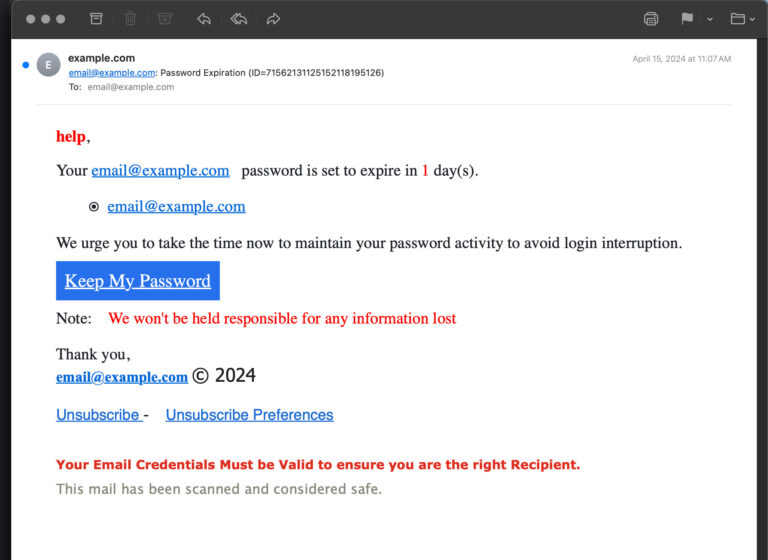
Some quishing attacks skip the physical sticker and go straight to your inbox. You receive an email claiming to be from a service you use, urging you to scan an attached QR code for account verification, a security update, or a limited-time offer. The email bypasses traditional link filters because the malicious URL is hidden in an image attachment. Your email scanner might not flag it. You scan the code with your phone, which is often less protected than your laptop, and land on a phishing page. This approach cleverly moves the attack from a monitored channel, your email, to an unmonitored one, your phone camera.
How QR Code Scams Lead to Malware and Data Theft
The immediate goal of a quishing attack is usually to get you onto a fake website. That site might look identical to a login page for Microsoft, Google, Dropbox, or your bank. When you enter your credentials, they go directly to the attacker. Some of these sites are so convincing that even security-conscious people fall for them, especially when the page appears on a small phone screen where URL details are harder to inspect. The credential theft alone can be catastrophic, but the danger often goes deeper.
Some malicious QR codes trigger automatic downloads of malware. This can be an information stealer that silently harvests passwords, session cookies, and other sensitive data from your phone. Other codes exploit vulnerabilities in your QR scanner app or your operating system, allowing remote code execution. A fully updated device is less vulnerable, but not invulnerable, and many small business owners delay phone updates just like they delay computer updates. The combination of a cleverly crafted QR code and an unpatched device is a recipe for a silent, devastating compromise that you might not discover for weeks.
The Hidden Danger of Tampered Legitimate Codes
One of the scariest aspects of QR code scams is that the attacker does not need to create a fake code from scratch. They can simply print a sticker with their own QR code and place it over a legitimate one. The original code on a restaurant menu, a product package, or a government notice gets covered by a sticker that is almost impossible to notice at a glance. The staff at the restaurant might not realize the sticker is there for hours or days. Every customer who scans it during that window is a potential victim. For a business owner who eats lunch while answering emails, that quick scan of the dessert menu could be the entry point for a breach.
This physical tampering is cheap, fast, and extremely effective. A scammer can visit a dozen parking meters, trade show booths, or community bulletin boards in a single afternoon and place their stickers. They do not need to be present when the victim scans. The passive nature of the scam means one hour of work can generate victims for days afterward. It is a low-risk, high-reward strategy that has spread rapidly because it works so well.
Building a Defense That Fits Your Business
The response to QR code scams is not to stop scanning codes altogether. That is like refusing to open any email because phishing exists. The solution is a set of simple habits and technical tweaks that dramatically lower your risk. These are practical steps any business owner can implement without needing a dedicated IT team.
Train Your Team to Pause Before Scanning
The single most powerful defense is a moment of hesitation. Teach your employees, and practice yourself, to pause before pointing a phone camera at a QR code. Ask three quick mental questions. Where did this code come from? Did I expect to see it here? Does anything about the sticker, the email, or the sign feel off? This pause interrupts the automatic scan reflex that scammers rely on. It takes two seconds. It costs nothing. Make it a visible part of your company culture. Praise people who stop to ask questions about a suspicious code. The pause is the difference between a safe day and a security incident.
Use a QR Scanner That Previews the URL
Most phone cameras automatically open a preview of the URL when you scan a QR code. Do not tap through blindly. Read the domain name. Look for misspellings, extra characters, or domains that do not match the organization the code claims to represent. If the code on a parking meter leads to a URL that ends in dot xyz instead of the city government’s dot gov, stop. If you use a dedicated QR scanner app, choose one that displays the full URL and offers security warnings about known malicious sites. Some mobile security apps include this feature. It adds a tiny step to each scan but gives you a crucial check before you commit.
Inspect Physical Codes Before Scanning
When you encounter a QR code on a physical surface, take a second to check it. Does it look like a sticker placed on top of something else? Can you feel a raised edge where a sticker overlaps the original printing? If the code is on a menu or a sign, ask an employee if they can confirm the code is theirs. Scammers count on you being too polite or too rushed to ask. Asking is not rude. It is smart. If the staff seem confused or unaware of the code, consider it a red flag and do not scan.
Verify Unsolicited Codes Through Another Channel
If you receive a QR code in an email, a text message, or a mailed flyer that you were not expecting, do not scan it immediately. Contact the supposed sender through a known phone number or their official website. Tell them you received a code and ask if it is legitimate. This verification step neutralizes the most common quishing tactics. A scammer can fake an email or a mailer, but they cannot intercept a phone call you initiate to a number you already trust. That out-of-band verification is a powerful protection against many forms of social engineering, QR codes included.
Keep Business Mobile Devices Updated
Your phone and tablet are computers. They need the same regular updates as your laptop. Operating system updates close security holes that malicious QR codes can exploit. Enable automatic updates on all business devices and set a policy that updates should be installed within a day or two of release. This single habit blocks a whole category of attacks that rely on known vulnerabilities. It is simple, free, and often neglected. Make it a part of your monthly routine to check that all company phones are current.
Consider Mobile Device Management for Company Phones
If your team uses company-provided phones, a mobile device management solution, even a basic one, adds strong protection. MDM can enforce update policies, restrict app installations to approved sources, and push security configurations automatically. It can also remotely wipe a lost or compromised device. For a small business, entry-level MDM is affordable and often bundled with cloud productivity suites. The setup takes some effort upfront but pays off by giving you visibility and control over the devices that access your sensitive data.
Watch for Tampered QR Codes on Your Own Business Materials
If your business uses QR codes on menus, flyers, invoices, or signage, check them regularly. Someone might place a fraudulent sticker over your code. Do a quick visual inspection of your printed materials once a week. If you distribute QR codes digitally, protect the source file so it cannot be easily swapped. This small habit protects your customers from being scammed in your name, which protects your reputation. A customer who gets phished through a code they scanned at your restaurant will associate that bad experience with your brand, even if you were a victim too.
Creating a Culture of Healthy Skepticism
Security is not just about tools and policies. It is about the way your team thinks. Building a culture of healthy skepticism around QR codes means making it safe and normal to question things. Encourage employees to speak up when a code looks suspicious. Celebrate the moments when someone catches a fake before it causes harm. If an employee accidentally scans a malicious code, handle it with support, not blame. A blame culture drives mistakes underground where they fester. A supportive culture surfaces problems quickly so you can contain them.
Share stories of real QR code scams with your team. When you read about a new quishing tactic, mention it in a team meeting or a group chat. The stories make the threat concrete. They turn an abstract warning into something your people can visualize and avoid. The goal is to weave a thread of awareness into the daily routine without creating paranoia. A team that talks openly about security is a team that defends itself naturally.
What to Do Immediately After a Suspicious Scan
If you or an employee scans a QR code and realizes something is wrong, act fast. Do not wait to see what happens. First, disconnect the device from the internet. Turn on airplane mode or turn off Wi-Fi and cellular data. This can stop malware from phoning home or exfiltrating data. Second, run a security scan using a reputable mobile antivirus or your MDM platform. Third, change passwords for any accounts that might have been exposed, starting with your email and financial accounts. Do this from a different, trusted device. Fourth, monitor those accounts for unusual activity for several weeks. Quick action can limit the damage from a moment of distraction.
Report the incident. If the malicious code was on a physical location like a parking meter or a restaurant table, tell the business or the local authorities. Your report might save another business owner from the same trap. If the scam involved your work email or client data, follow your incident response plan and consider whether you need to notify affected parties. The aftermath of a quishing attack is stressful, but a clear set of response steps turns panic into purposeful action.
Conclusion
QR code scams are not a passing fad. They are a persistent, evolving threat that targets the convenience and trust that small business owners rely on every day. The same technology that makes it easy to pay a vendor, connect to Wi-Fi, or access a menu also gives scammers a powerful new way to reach you. Quishing attacks work because they exploit the gap between the speed of modern life and the slower, more careful verification habits that most of us have not yet built. The good news is that those habits are simple to learn and easy to practice. Pause before you scan. Preview the URL. Verify unsolicited codes through a trusted channel. Keep your devices updated. Check your own business materials for tampering. Talk openly with your team about the risks. None of these steps require technical wizardry. They require attention, and attention is free. In a world where a tiny black-and-white square can hide a world of trouble, your awareness is the shield that keeps your business safe. Stay curious, stay cautious, and keep scanning wisely.