
Cybersecurity Checklist for Small Business Owners (Free Download)
You know that feeling when you leave the house and halfway down the street you wonder if you locked the front door? Running a small business in 2026 often feels like that, except the door has a hundred invisible handles and someone is always jiggling them. Cybersecurity can seem like a giant, technical maze designed for people with IT degrees and big budgets. But honestly, a lot of it comes down to a simple checklist. The kind of list that sits on your desk or lives in your phone, reminding you to do the small, vital things that keep the wolves away. I put this guide together because I have seen too many smart, hardworking owners lose sleep over threats that could have been stopped with a few basic habits. And yes, at the end, I will point you toward a free downloadable version of this checklist so you can print it, stick it on the wall, and actually use it. No gimmicks, just practical peace of mind.
The Foundation: What Every Small Business Must Secure First
Before you dive into complex tools, you need to lock down the absolute essentials. Think of these as the locks on your actual front door. If these are flimsy, nothing else you do really matters.
Secure Your Email Accounts Like They Are the Crown Jewels
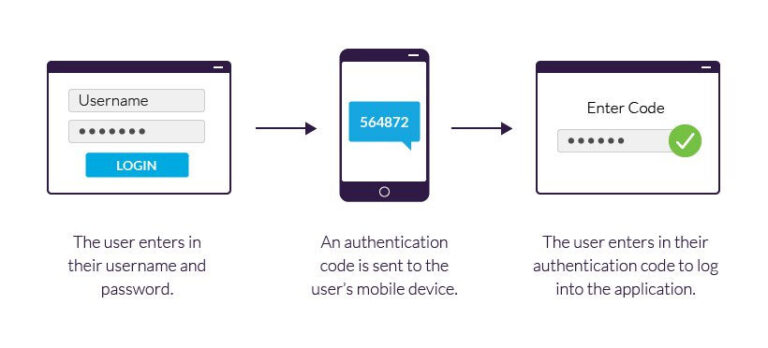
For most small businesses, email is the master key. If a criminal gets into your inbox, they can reset passwords for everything else: your bank, your social media, your cloud storage. Start by turning on multi-factor authentication, often called MFA, on every email account. It is that step where you enter a code from your phone after typing your password. Yes, it adds a tiny bit of friction, but that friction stops an attacker who stole your password from actually getting in. Then, make sure nobody is reusing passwords. A password manager app can generate and remember long, random strings of characters so your staff does not have to. Finally, set up forwarding rules alerts. Sometimes a hacker gets in and quietly forwards all your mail to themselves. A quick monthly check of your email rules takes two minutes and can catch that early.
Protect Your Devices with Updates and Endpoint Security
The computers, phones, and tablets you use every day are called endpoints, and they are the most common entry points for trouble. The single easiest win here is automatic updates. When your operating system or software begs you to restart for an update, it is almost always patching a security hole that criminals are already exploiting. Turn on automatic updates for Windows, macOS, your phone, and even your router if it supports it. Beyond updates, invest in a modern endpoint protection tool. The old antivirus that slowed your machine to a crawl has been replaced by smarter, lighter solutions that watch for suspicious behavior, not just known viruses. Many are designed specifically for small teams and are managed through a straightforward app. They will block malicious websites, scan downloads, and alert you if something fishy is happening, all for a few dollars per device each month.
Backups That Actually Save You When Things Go Wrong
Imagine walking into your office tomorrow and every file is locked with a ransom note on the screen. If you have a clean, recent backup stored somewhere separate from your main network, you can shrug and restore everything. If you do not, you are in a world of pain. A solid backup strategy follows a rule called 3-2-1. Keep at least three copies of your critical data, on two different types of media, with one copy stored offsite. The offsite copy might be a cloud service with a separate login, not just another folder on the same system. And here is the part most people skip: test your backups. Once a month, actually try to restore a random file. A backup you have never tested is just a wish, not a safety net.
Protecting the Human Element: Your Team’s Role
Technology can only do so much. The people on your team are both your greatest vulnerability and your best line of defense, depending on how you prepare them.
Phishing Awareness Training – Make It a Habit
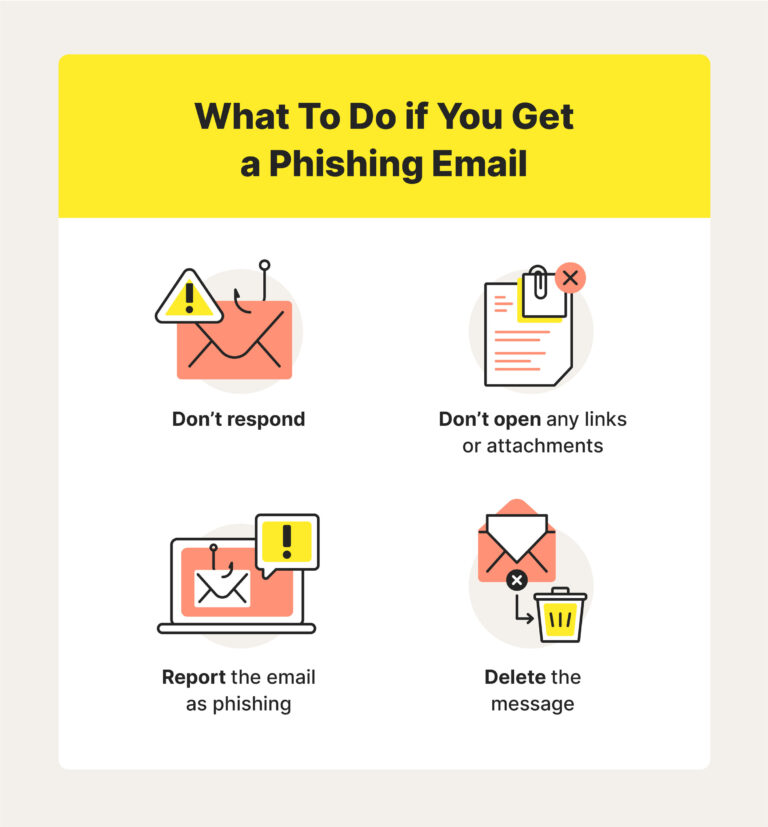
Phishing emails are no longer the clumsy, badly spelled messages from a decade ago. Now, thanks to AI, attackers craft emails that look exactly like an invoice from a vendor you use or a quick request from your boss. Your team needs to know how to spot the subtle signs. Every few months, spend fifteen minutes over coffee looking at real examples. Show them how to hover over a link to see where it really goes before clicking. Teach them to verify unexpected payment requests with a quick phone call, not by replying to the email. And make it absolutely safe for someone to say, “I think I clicked something I shouldn’t have.” When people are scared of getting in trouble, they hide mistakes, and a small incident turns into a full-blown breach.
Password Hygiene and a Password Manager
“Password123” or the name of your business plus the current year is an open invitation. Every account needs a unique, strong password, and nobody can memorize twenty of those. That is where a password manager becomes a lifesaver. It stores everything in an encrypted vault, locked behind one master password that only you know. It can even generate passwords like “xK9$mP2!vLq7” so you never have to think one up again. Encourage your team to use it for personal accounts too, because a breach on their personal email can spill into work. The goal is to make good password hygiene so easy that it stops being a burden.
Clear Access Rules – Who Gets What, Revoke Ex-Employees
Not everyone in your business needs access to everything. The part-time bookkeeper does not need access to your client project files, and the social media intern does not need access to financial records. Set up user accounts with the minimum permissions necessary for each role. This limits the damage if one account gets compromised. Also, have a clear offboarding checklist. The day someone leaves, whether it is on good terms or not, immediately disable their accounts, change shared passwords they knew, and reclaim any company devices. Leaving old accounts active is like leaving a spare key under the mat for someone who no longer works there.
Network and Data Defenses: Technical Steps That Matter
You do not need to be a network engineer to get these basics right, but they make a huge difference in keeping intruders out.
Firewall and Wi-Fi Security Basics
Your office network has a gatekeeper called a firewall, and it needs to be turned on and properly configured. Most modern routers have one built in, but check that it is active and set to a reasonable security level. For Wi-Fi, never use the default password that came printed on the router. Create a strong, unique password for your main business network. Even better, set up a separate guest network for visitors or for smart devices like coffee makers and thermostats. That way, if a guest’s phone has malware, it cannot jump onto the network where your business files live.
Data Encryption and Secure File Sharing
Encryption sounds technical, but the idea is simple: it scrambles your data so that even if someone steals your laptop or intercepts a file, they cannot read it. Turn on full-disk encryption on every company computer and phone. Most modern devices have this built in and just need you to flip a switch in the settings. When sharing sensitive files with clients or partners, avoid email attachments. Use a secure file-sharing service that encrypts the data in transit and at rest. It is a small change that protects both you and the person on the other end.

Software and Vendor Risk – Ask the Uncomfortable Questions
You might have excellent security, but what about your accounting software company or your online booking system? Supply chain attacks, where criminals compromise a trusted software provider and use that to reach all its customers, are on the rise. Before signing up with a new vendor, ask them about their security practices. Do they use MFA internally? How do they handle data? When was their last security audit? A good vendor will welcome the questions. A bad one will dodge them, and that tells you everything you need to know.
Planning for the Worst: Incident Response and Insurance
No matter how careful you are, there is always a chance something slips through. Having a plan beforehand stops panic from turning a bad situation into a catastrophe.
Create a Simple Incident Response One-Pager
You do not need a fifty-page manual. A single sheet of paper with clear steps is enough. It should say who to call first, like a cyber incident response firm or your insurance helpline, and what immediate actions to take. Unplug the affected machine from the network but do not turn it off, because the temporary memory holds clues. Change critical passwords from a clean device. Tell your team so they do not open anything suspicious. Keep this sheet printed and saved somewhere everyone can find it. In a crisis, brains go blank, and a simple checklist saves precious minutes.
Cyber Insurance – What to Look For
Cyber insurance has become much more common for small businesses, and for good reason. A good policy covers things like forensic investigation costs, legal fees, customer notification expenses, and even ransom payments if you choose to go that route. When shopping, read the fine print carefully. Some policies will not pay out if you failed to have basic security measures like MFA or backups in place. A knowledgeable broker who works with small businesses can help you find a policy that fits your risks and your budget. The application process itself is valuable because it forces you to check off those foundational security practices, often lowering your premium.
Daily, Weekly, Monthly: A Routine to Keep You Safe
Checklists only work if they become part of your rhythm. Here is how to weave cybersecurity into the natural flow of your business without it feeling like a second job.
The Quick Daily Check
You do not need to do a deep dive every morning. Just keep an eye out for anything unusual. If a colleague’s email suddenly sounds off in tone or asks for an urgent wire transfer, pick up the phone and verify. Glance at your backup reports, most cloud services send a daily summary email, and confirm that last night’s backup completed without errors. If you use a password manager, it often flags weak or reused passwords. Spend two minutes addressing those alerts instead of ignoring them. These tiny daily habits build a powerful early warning system.
The Monthly Deep Dive
Once a month, set aside an hour for a slightly bigger check. Review the list of people who have access to your critical accounts and remove anyone who does not need it anymore. Check that all devices, including that old tablet in the drawer that runs your music playlist, have the latest updates installed. Test one of your backups by restoring a random file. Gather your team for a quick coffee chat about any new phishing tricks they have seen. This monthly rhythm keeps security from fading into the background. It signals to everyone that this matters, not in a scary way, but like a regular oil change for the business.
Get Your Free Downloadable Cybersecurity Checklist
I designed a one-page PDF checklist that pulls all of this together into a clean, actionable format. It is built for busy owners who want the essentials without the noise. You can print it, laminate it, or keep it on your phone. Each item is a simple yes or no, so you can quickly see where you stand and what needs attention. The checklist covers email security, device protection, backups, team training, network basics, incident response, and insurance. It also includes a few blank lines for notes, because every business has unique quirks. Grab your free copy at the link below this article, and start checking things off today. No signup tricks, no endless emails. Just a straightforward tool to help you sleep better at night.
Conclusion
The thought of a cyberattack hitting your business can feel heavy, but the path to protection is built on small, consistent steps. You do not need to become a technical expert overnight. You just need a clear checklist and the habit of checking things off. Start with the absolute basics: turn on multi-factor authentication, set up automatic backups and test them, and keep everything updated. From there, bring your team along. Make security part of your culture, not a lecture, but a shared responsibility that protects everyone’s livelihood. The checklist I created is your starting point, a simple way to see what is solid and what needs shoring up. Once you get into the rhythm, you will find that cybersecurity stops being a source of anxiety and becomes just another part of running a well-managed business. You have built something worth protecting, and these habits are how you keep it safe for the long run.