
Best Email Security Solutions for SMBs in 2026: Full Comparison
The Morning You Realize Email Is a Liability
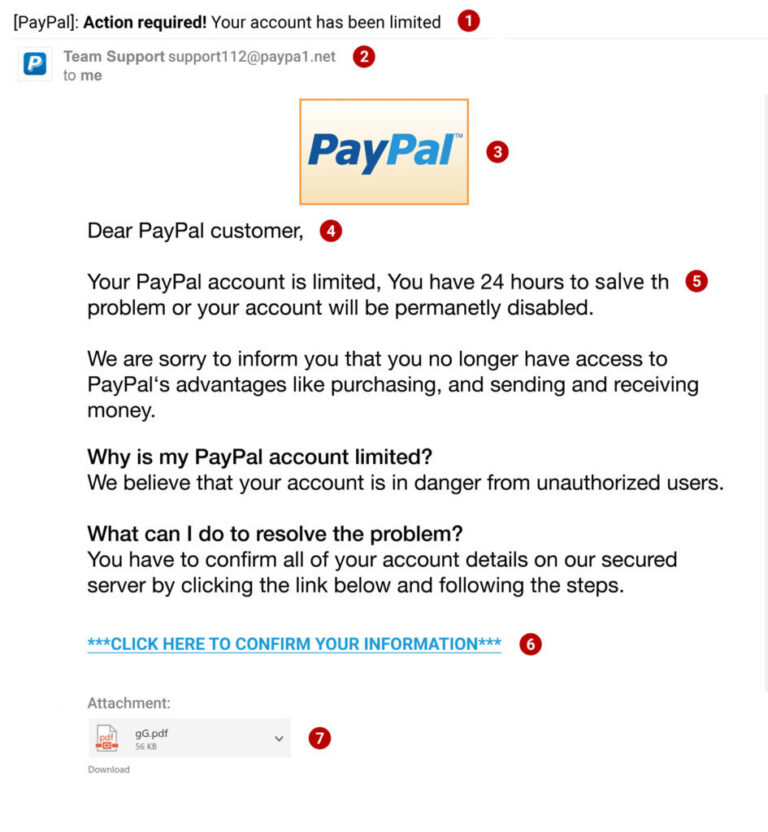
Picture this. You open your laptop on a Tuesday, coffee in hand, and your bookkeeper’s face is pale. “I clicked something,” she says. “It looked like an invoice from our supplier.” Just like that, a phishing email slipped through. And now your client data might be compromised.
Small businesses live inside their inboxes. Contracts, payment details, customer conversations — everything flows through email. Yet for years, SMBs relied on whatever basic spam filter their hosting provider threw in for free. The truth is, that’s barely a fence anymore. Attackers know small teams rarely invest in dedicated email security, and they exploit that gap ruthlessly.
The good news? In 2026, there are email security solutions built precisely for smaller budgets and lean teams. They don’t require a full-time IT person, and some set up in under an hour. The challenge is sorting through the options without drowning in marketing jargon.
Why SMBs Are the Sweet Spot for Email Attacks
Here’s something that might surprise you. Nearly half of all cyberattacks now target small businesses. Not because the data is more valuable than a Fortune 500 company’s, but because the door is often wide open. A ten-person law firm might process wire transfers via email. A small marketing agency handles dozens of client social media logins. One compromised password sent through a phishing link, and an attacker waltzes in.
Criminals have also gotten smarter. Gone are the days of clumsy, misspelled Nigerian prince emails. Today’s phishing emails mimic your actual vendors. They reference recent conversations. Sometimes they even arrive from a real colleague’s account that was hacked a week earlier. An email security solution has to spot these subtle impersonations, not just block obvious spam.
What a Good Email Security Solution Actually Does
Before comparing products, it helps to understand what the tools are doing under the hood. A lot of people think email security is just a spam filter. It’s not. It’s a layered defense system.
Blocking Threats Before They Reach the Inbox
The first layer scans incoming messages for known malware signatures, suspicious links, and attachment sandboxing. Sandboxing means opening a PDF or document in a safe, isolated environment to see if it does something nasty. If it does, the email never arrives. Your team never even sees the danger.
Spotting Social Engineering and Impersonation
This is where modern tools shine. They analyze the writing style and metadata. They flag emails that claim to be from your CEO but come from a weird Gmail address. They notice when the payment instructions in an invoice suddenly change, a classic sign of a business email compromise scam. Some even use AI to learn your typical communication patterns and yell when something feels off.
Protecting Outbound Email Too
It’s not just about what comes in. If an employee’s machine gets infected, that malware might start spamming your clients. A good solution scans outbound traffic, too, protecting your reputation. And if you handle sensitive data like health records or credit card numbers, it can automatically encrypt emails or block accidental data leaks. That’s a lifesaver during a compliance audit.
Microsoft Defender for Office 365: The Obvious First Stop
For most SMBs, especially those already on Microsoft 365, Defender is sitting right there. It comes baked into Business Premium plans or as a cheap add-on. And honestly, it has improved massively.
The integration is seamless. There’s no gateway to reconfigure, no MX records to change. It just works inside the Exchange Online environment. The Safe Links feature rewrites URLs so that if someone clicks a link, it’s checked in real-time. Safe Attachments detonates files in a sandbox before delivery. The anti-phishing engine learns from billions of signals across Microsoft’s global network.
On the flip side, Defender can feel like a jack-of-all-trades, master of none. The interface is buried inside the sprawling Microsoft 365 admin center, and fine-tuning policies sometimes demands more technical patience than a small team wants to spend. It covers the basics well, but against highly targeted impersonation attacks, dedicated third-party tools still outperform it.
Avanan: The AI-Powered Layer That Sits on Top
Avanah, now part of Check Point, takes a different approach. Instead of replacing your existing email gateway, it sits on top via API, scanning emails inside the mailbox itself. For a small team already using Microsoft 365 or Google Workspace, setup takes about ten minutes.
What sets Avanan apart is the sheer number of threat feeds it pulls from. It combines AI models from multiple security vendors, not just one. When an email passes through, it’s inspected by engines that look for different attack patterns simultaneously. The result is a catch rate that consistently beats single-engine solutions in independent tests.
The catch is that the sheer volume of threat intelligence can occasionally generate false positives that need whitelisting. It’s not a set-and-forget tool entirely. But for an SMB that wants enterprise-grade protection without overhauling their entire email setup, Avanan hits a sweet spot. Pricing is per user, and discounts for annual commitments bring it within reach.
Proofpoint Essentials: Built for the SMB From the Ground Up
Proofpoint has long been the heavyweight for large enterprises. Proofpoint Essentials, though, was designed specifically for smaller organizations. It’s not a stripped-down enterprise tool with half the buttons removed. It was built with SMB workflows in mind.
The interface is clean and surprisingly straightforward. You get the same URL defense and attachment sandboxing technology that big companies use, but packaged so a business owner can configure it without a certification. The impersonation detection is particularly strong. It catches display name spoofing — when an attacker puts your boss’s name on a random Gmail address — something basic filters miss.
One area where Proofpoint Essentials stumbles is advanced reporting. If you want deep forensic details about who clicked what and when, you’ll find fewer granular controls than the enterprise version. But for day-to-day protection that doesn’t demand constant babysitting, it’s a solid contender.
Barracuda Email Protection: The All-Rounder with Backup Built In
Barracuda has been in the email security game forever. Their SMB solution combines threat filtering with email continuity and even cloud backup. That combo is genuinely useful. If your email server goes down, your team can still send and receive through Barracuda’s web interface. And if an employee accidentally deletes a folder of invoices, the backup has you covered.
The threat detection is robust. Link protection rewrites URLs and scans them at click time. Account takeover detection monitors for unusual login patterns, like a user suddenly sending emails from a different country at 3 a.m. The AI learns your communication patterns over time, reducing false positives.
The trade-off, though, is that the feature-rich bundle can feel a little overwhelming during initial setup. Some SMBs might never touch half the features they’re paying for. And the per-user pricing, while competitive, adds up quickly if you want every add-on module.
SpamTitan: The Budget-Conscious Underdog
Not every small business can afford premium per-user pricing. SpamTitan, from TitanHQ, targets exactly that crowd. It’s a straightforward spam and malware filter that does its job without fancy extras. The interface won’t win design awards, but it’s functional and quick to navigate.
SpamTitan uses dual anti-virus engines and sandboxing, and its catch rate for spam is impressively high. For phishing, it handles known threats well, though it lacks some of the sophisticated social engineering detection that AI-driven competitors offer. The big advantage is cost. It’s priced per domain or per user at a fraction of what Proofpoint or Avanan charge.
If your team is tiny and your main headache is a clogged inbox full of junk, SpamTitan might be enough. If you face targeted impersonation attacks or handle sensitive client data, you’ll likely want something smarter.
Sophos Email: The Security Ecosystem Play
Sophos is best known for endpoint protection, and their email security integrates directly with that ecosystem. If you already run Sophos antivirus on your office computers, adding Sophos Email gives you a single management console. That’s a real convenience for a small IT team.
The email filtering uses AI to detect phishing, and it ties into Sophos Central for centralized policy management. Time-of-click URL protection rewrites links and checks them at the moment of click. Data loss prevention helps stop sensitive files from leaving your organization by mistake.
The standalone email security without the broader Sophos ecosystem feels a bit less compelling. You get a solid filter, but some features are gated behind higher-tier bundles. The pricing works best when it’s part of a wider Sophos deployment.
The Comparison That Actually Matters
Choosing isn’t about picking the “best” product on a spreadsheet. It’s about which one fits your daily reality. If your team lives inside Microsoft 365 and budget is tight, start with Defender. You might find it’s enough. If phishing emails pretending to be your CEO keep landing in inboxes, Avanan’s AI layer will likely catch what Defender misses.
If you want a standalone solution built for SMBs, Proofpoint Essentials and Barracuda both deliver. Proofpoint is slightly more intuitive for security beginners; Barracuda gives you the backup and continuity extras. SpamTitan wins on price, no question. Sophos makes sense if you already invest in their other products.
The Mistake SMBs Keep Making
Too many small businesses treat email security like a one-time purchase. They set it, then ignore it for two years. That’s dangerous. Attackers evolve. A filter that blocked everything in 2024 might let through a clever new impersonation scam today.
Schedule a quick review every quarter. Look at the quarantine reports. Check which users are most targeted. Adjust the sensitivity if your team keeps missing legitimate emails or if too much junk is getting through. A tool is only as good as its tuning, and tuning takes very little time once you get into the habit.
How to Roll Out Email Security Without Friction
The best security tool is the one nobody complains about. If your new filter quarantines half the legitimate newsletters your team subscribes to, people will start working around it. They’ll forward emails to personal accounts or demand you disable the whole thing.
Start with the default policies, then spend the first week actively whitelisting. Train the filter. When someone misses an expected email, address it quickly so they trust the system. And most importantly, explain what you’re doing. A five-minute team meeting where you show a real phishing email that the tool caught builds more goodwill than a hundred IT policy memos.
The Human Side of Email Security
No software catches everything. Your employees are still the last line of defense. The best email security solution in the world can’t stop someone from calling a scammer who left a voicemail referencing an email that got through.
Encourage a culture where it’s okay to ask, “Does this look weird to you?” Reward caution, not speed. If someone forwards a suspicious email to you for a second opinion, thank them. A team that communicates openly about security is harder to trick than a team armed with expensive software but afraid to speak up.
Conclusion
Email security for SMBs in 2026 isn’t a luxury. It’s a quiet necessity, like locking the office door at night. The solutions available today are genuinely powerful, and they’ve become accessible to businesses of every size. Microsoft Defender gives you a solid foundation, Avanan layers on AI precision, Proofpoint Essentials and Barracuda offer dedicated SMB experiences, while SpamTitan and Sophos fill specific niches. The right pick depends on your setup, your team’s technical comfort, and the threats you face most often. Invest in a tool, tune it gently, and build a team culture that doubles down on the protection. Your inbox will thank you, and so will your clients.