
1Password Business vs Bitwarden Teams: Which Should You Choose
Choosing a password manager for your business can feel strangely personal. It’s the tool your team touches dozens of times a day. If it’s clunky, people grumble and find ways around it. If it’s smooth, it fades into the background and quietly makes everyone safer. I’ve been setting up both 1Password and Bitwarden for small businesses for a while now, and the conversation almost always starts the same way. Someone asks me which one is better. The honest answer is that it depends on your team, your workflow, and what kind of security culture you’re trying to build. In 2026, both 1Password Business and Bitwarden Teams have matured into excellent options, but they take different paths to the same goal. Let’s break down what each one does well, where they stumble, and how to figure out which one belongs in your daily stack.
Why Your Small Business Needs a Team Password Manager
Before we put these two head-to-head, it’s worth asking why a shared spreadsheet or a sticky note system doesn’t cut it anymore. Small businesses run on shared accounts. The social media login, the shipping platform, the accounting software, the domain registrar. If you’re still emailing passwords or storing them in a shared document, you’re one disgruntled ex-employee away from a serious mess. A business password manager gives you a central vault where credentials are encrypted, access is auditable, and sharing is controlled. You can grant someone access to the company Twitter without revealing the actual password. And when someone leaves, you revoke their access in seconds without resetting fifty accounts. That alone is worth the subscription. Beyond convenience, there’s the security angle. Most data breaches start with stolen or reused credentials. A password manager generates and remembers unique, strong passwords for every site, so one breached account doesn’t cascade into a nightmare.
How We Compared 1Password Business and Bitwarden Teams
I looked at both tools through the lens of a typical small business owner, not an IT security veteran. That means I focused on the experience of a team with maybe five to thirty people, some of whom still call their browser “the internet.” I tested the onboarding flow. How fast can you get from sign-up to fully protected? I dug into the admin controls because managing people is where these tools earn their keep. I looked at the sharing model. In a small business, collaboration is everything, and sharing credentials safely should feel as natural as sending a Slack message. I also considered the user interface, the quality of the mobile apps, the ability to store more than just passwords, and the price per user. Finally, I tested the recovery process. When an employee forgets their master password on a Monday morning, how painful is the fix?
1Password Business: The Polished Experience
1Password has been around long enough to develop a certain sheen. The app feels polished in a way that’s hard to describe until you use it side by side with something else. Small animations, thoughtful placements of buttons, a search bar that actually finds what you want. It’s the kind of design that makes people not hate using a security tool.
Setup and User Experience
Getting started with 1Password Business is straightforward. An admin creates an account, invites team members via email, and each person sets up a master password and a Secret Key. The Secret Key is a long random string stored on your device that adds a layer of encryption beyond the master password. It’s a brilliant security feature, but it does mean onboarding requires a tiny bit of hand-holding. New users need to save their Emergency Kit, a PDF with their sign-in details. I’ve seen people skip that step, and that creates trouble later.
Once you’re in, the interface is clean. The sidebar shows your vaults, and the main window lists your items with recognizable icons. The browser extension works beautifully, auto-filling credentials and even two-factor authentication codes without breaking stride. The mobile apps on iOS and Android are nearly as full-featured as the desktop version. I particularly appreciate the Watchtower dashboard, which flags weak passwords, reused passwords, and logins that have appeared in known breaches. It turns a static vault into a proactive security advisor.
Sharing and Collaboration
1Password’s vault system is intuitive. You can create shared vaults for departments, projects, or clients. Permissions are granular. Someone might have full edit rights in the Marketing vault but only view access in the Finance vault. You can share individual items via a secure link, which expires and can be restricted to specific email addresses. The shared link feature is handy for sending a Wi-Fi password to a guest without exposing your entire vault.
One subtle but powerful feature is the ability to create vaults that certain admins can manage but not view. This lets an IT person restore access without ever seeing the actual passwords. For a small business with a part-time IT consultant, that separation of duties is reassuring. The item history tracks changes, so if someone accidentally edits a credit card entry, you can roll it back. Guest accounts allow you to share selected vaults with external partners, like a bookkeeper, without paying for a full seat.
Admin Controls and Security
The admin console in 1Password Business gives you a clear overview of who has access to what. You can enforce policies like requiring two-factor authentication, setting a minimum master password strength, and limiting vault access to specific IP ranges. The activity log captures every sign-in and change, which is helpful if you need to trace a suspicious action.
Security is where 1Password really flexes. The combination of the master password and the Secret Key means even if someone steals 1Password’s server data, your vaults remain encrypted and unreadable. The company has a public bug bounty program and regular third-party security audits, and they publish the results. That transparency builds trust. The travel mode feature lets you mark vaults as safe for travel, removing them from your devices when crossing borders, and restoring them with a click later. For a consulting firm with sensitive client data, this is a thoughtful touch.
Pricing and Value
1Password Business is priced per user per month. It’s not the cheapest option on the market, but you get a lot for the money. The plan includes family accounts for every employee, which is a clever perk that gets your team to use strong passwords at home too. When you add up the included features, the seamless integrations, and the user experience, the cost often justifies itself in reduced support tickets and fewer security incidents. The free trial is generous, and the migration tools from other password managers work reliably.
Bitwarden Teams: The Open-Source Powerhouse
Bitwarden comes from a different philosophy. It’s open-source, community-audited, and priced in a way that makes you feel like you’re getting away with something. The interface won’t win design awards, but it’s functional and fast. For a certain kind of small business, the one that values transparency and control above polish, Bitwarden feels like a trusted workhorse.
Setup and User Experience
Signing up for Bitwarden Teams is simple. The admin creates an organization, sends invitations, and users set up a master password. There’s no Secret Key equivalent, so the security model relies solely on the strength of the master password and the optional two-factor authentication. That’s slightly less robust against server-side breaches, but Bitwarden’s open-source nature means the encryption implementation has been scrutinized by countless eyes.
The interface is less flashy than 1Password’s, but it’s clean and logical. Items are organized into folders or collections, and the search function is quick. The browser extension works reliably, though the auto-fill sometimes needs an extra click compared to 1Password’s near-invisible operation. The mobile apps are solid, with biometric unlock and a decent autofill service on both platforms. Bitwarden has been steadily improving its design, and the 2026 version feels much more modern than a few years ago. The Send feature, which lets you securely transmit text or files with an expiration link, mirrors 1Password’s shared links and works well.
Sharing and Collaboration
Bitwarden’s approach to sharing uses Collections, which are groups of items you can assign to users or groups. You can create a Collection for the HR team, add the payroll logins, and grant access with read-only or edit permissions. It’s straightforward, though the admin interface for managing collections can feel a bit clunky when you have dozens of them. The hierarchy is less visual than 1Password’s vault system, and you might find yourself scrolling through lists more than you’d like.
The Teams plan allows for unlimited shared Collections, which is generous. You can also designate external users with limited access to specific Collections for free, which keeps costs down when you need a freelancer to access just one set of credentials. The item history tracks changes similarly to 1Password, though the diff view is more technical and less user-friendly. Bitwarden recently added a passwordless login option using a security key or biometrics, which is a welcome step toward reducing reliance on master passwords.
Admin Controls and Security
The admin dashboard in Bitwarden Teams gives you control over user enrollment, two-factor authentication enforcement, and event logging. The logs capture logins, item changes, and sharing actions, and you can export them for external analysis. Policy enforcement is more limited than 1Password. You can require two-factor authentication, set a minimum password strength, and restrict certain domains, but you don’t get the fine-grained IP restrictions or the travel mode that 1Password offers.
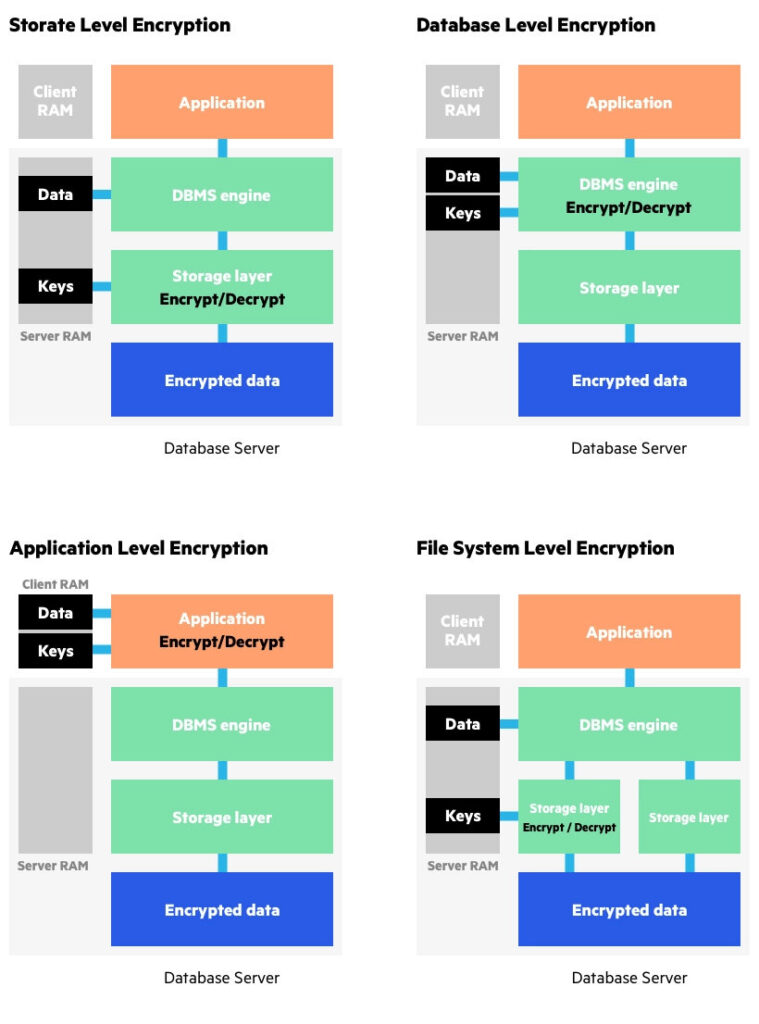
Security-wise, Bitwarden is rock solid. The code is open for anyone to inspect, and independent audits are published for every major release. The encryption is AES-256 bit, the same standard banks use, and your vault is encrypted locally before syncing to the servers. The zero-knowledge architecture ensures Bitwarden cannot access your passwords. The company’s transparency and ethical stance resonate with businesses that want to support open-source software. The self-hosting option is a unique advantage. If your business has strict data sovereignty requirements, you can run your own Bitwarden server on your infrastructure, completely cutting out the cloud dependency.
Pricing and Value
Bitwarden Teams is priced dramatically lower than most competitors, including 1Password. The per-user cost is a fraction of what you’d pay elsewhere, and the plan includes all core features without hidden upsells. The free trial is generous, and the free personal tier for individuals is excellent for getting people comfortable with the tool before upgrading. The family plan, sold separately, is also very affordable. For a bootstrapped startup or a non-profit with a tight budget, Bitwarden delivers immense value without sacrificing core security. The self-hosting option can further reduce costs if you have a spare server and some technical time.
Head-to-Head: Key Differences That Matter
Both tools are great, but they differ in ways that will matter more to some businesses than others. Let’s walk through the main decision points honestly.
User Interface and Daily Workflow
1Password wins here for most non-technical users. The interface feels designed by people who care deeply about the small details. The auto-fill is so smooth that new users quickly forget they’re even using a password manager. Bitwarden is functional but less intuitive. A person who struggles with technology might find Bitwarden’s menus slightly confusing and the auto-fill slightly inconsistent. However, if your team includes developers or tech-savvy operators, Bitwarden’s straightforward efficiency might actually be preferred. It doesn’t try to hold your hand, and some people like that.
Security Architecture
Both are secure, but they take different approaches. 1Password’s Secret Key adds a strong layer of protection against server breaches, making password cracking infeasible even with a weak master password. Bitwarden relies on a strong master password and two-factor authentication, which is sufficient for most threats but technically less resistant to a determined attacker who gets hold of the encrypted blob from the server. Bitwarden’s open-source nature means the code is constantly reviewed by the community, and vulnerabilities tend to be found and patched quickly. 1Password’s closed-source model relies on the company’s own audits and bug bounty, which have been consistently solid. For most small businesses, both are well above the bar. But if you demand the absolute highest server-side breach protection, 1Password’s architecture edges ahead.
Sharing Flexibility
1Password’s vault model is more flexible and easier to manage at scale. The visual separation of vaults mirrors how people think about departments and projects. The guest accounts and vault-level permissions are smooth. Bitwarden’s Collections work, but the management interface is less polished, and you might spend more time organizing. For a business that shares credentials heavily with external partners, 1Password’s shared link and guest system feels more refined. Bitwarden’s equivalent with Send is close but separate from the vault management, which can be confusing.
Admin and Reporting
1Password offers a richer admin experience. The activity logs are detailed, the policy enforcement is granular, and the dashboard gives you a clear security overview with Watchtower insights aggregated across the team. Bitwarden’s admin panel covers the essentials but lacks the advanced policies and the visual breach monitoring that 1Password integrates. If compliance reporting or detailed audit trails matter to your business, 1Password’s admin tools will save you time and headaches.
Price and Open Source
Bitwarden is the clear leader on price. The cost difference per user per month is substantial, and for a team of twenty, the annual savings could fund another security tool or a nice team dinner. The open-source philosophy also matters to businesses that prioritize transparency and want to avoid vendor lock-in. 1Password is premium-priced, and you feel that premium in every pixel, but you’re paying for the design, the support, and the integrated experience. Neither is a wrong choice financially, but Bitwarden makes password management accessible on a shoestring budget.
Which One Fits Your Small Business?
If your team values a polished, frictionless experience and you’re willing to pay for it, 1Password Business will make your employees actually enjoy using a password manager. The family accounts perk is a genuine security win that extends your protection beyond the office. The security architecture with the Secret Key provides an extra cushion that helps you sleep better. It’s the right choice for businesses where ease of use is the top priority, because if people use the tool correctly, they’re safer. It’s especially suited to creative agencies, law firms, and professional services where client confidentiality and smooth client collaboration matter daily.
If your team is budget-conscious, technically inclined, or passionate about open-source software, Bitwarden Teams delivers exceptional value. It does everything a password manager should, without the polish but with complete transparency. The self-hosting option is a unique feature for businesses with specific compliance needs or a desire to control their own infrastructure. It’s a great fit for tech startups, non-profits, and distributed teams with developers who appreciate the ability to inspect the code. The lower price point means you can deploy it across a larger team without a second thought.
Conclusion
I’ve set up both tools for businesses that are still running today, safely logging into hundreds of accounts with strong, unique passwords they never have to remember. The choice between 1Password Business and Bitwarden Teams isn’t about good versus bad. It’s about where you want to invest your money and your team’s daily patience. 1Password feels like a luxury car that makes the drive effortless. Bitwarden feels like a reliable engine you can tinker with and trust completely. Both will get you where you need to go. The most important thing isn’t which one you pick, but that you pick one and roll it out across your entire team. That shared spreadsheet with passwords in it? That’s a disaster waiting to happen. Replace it this week with whichever of these two fits your budget and your culture, and you’ll have closed one of the biggest security gaps small businesses face.