How to Create a Cybersecurity Policy for Your Small Business
You have probably heard the word policy and felt your eyes glaze over. It sounds like something reserved for big corporations with legal departments and endless rows of cubicles. But here is the thing. A cybersecurity policy is not a luxury. It is the single document that can save your business from absolute chaos when something goes wrong. It tells everyone what to do, what not to do, and who to call. Without it, you are hoping your employees read your mind. And in the middle of a panic, hope is not a strategy. I want to walk you through exactly how to build one for your small business, step by step, in plain language. By the end, you will have a clear roadmap to a policy that actually works for your team, not just another dusty file nobody reads.
Why a Written Cybersecurity Policy Is No Longer Optional
There was a time when a handshake and a verbal understanding covered most things. That time is gone. Clients, banks, and insurance companies now expect you to have something written down. They want to see that you have thought about security, not just crossed your fingers. A policy is your proof that you take this seriously. It also protects you legally if an incident happens and someone asks what your standards were. Saying we told everyone to be careful does not hold up. A documented policy does.
The Risk of Operating Without a Clear Plan
Think about a typical Tuesday morning. An employee gets an email that looks like it came from you, asking for a quick wire transfer. The email is convincing. It mentions a client by name and references a recent project. Without a policy that clearly states how payment requests must be verified, that employee acts on instinct. They might send the money. A simple rule like always confirm wire requests with a phone call could have stopped the loss before it started. A written policy puts that rule in everyone’s hands.
The absence of a policy also means everyone makes up their own security habits. One person uses the same weak password everywhere. Another saves sensitive client files to their personal cloud storage because it is convenient. Nobody means harm. They just do not have a shared standard to follow. When a breach happens, the chaos multiplies because nobody knows what to do first. A policy gives you a single source of truth. In a crisis, that clarity is worth its weight in gold.
How Policies Satisfy Clients and Partners
Your larger clients are increasingly sending out security questionnaires before they sign a contract. They want to know if you have a cybersecurity policy in place. If you cannot answer yes, you might lose the deal. It is that simple. I have seen small marketing agencies get dropped from vendor lists because they could not demonstrate basic security documentation. The irony is that the work they did was excellent. The policy was the missing piece.
Insurance carriers ask the same questions. When you apply for cyber insurance, one of the first things they check is whether you have a formal policy. If you do, your premium might be lower. If you do not, they might refuse to cover you entirely. A policy signals to the outside world that you are a professional operation. It builds trust with the people who pay your bills. And that trust translates directly into revenue. Writing the document takes a few hours. The business you protect could represent years of hard work.
Defining the Scope of Your Policy
Before you write a single word, you need to decide what the policy covers. This does not have to be complicated. You are not drafting a hundred-page manual. You are mapping out the boundaries of your digital world. Who does the policy apply to, what devices and data fall under its umbrella, and where does your responsibility begin and end. Getting this clear upfront stops confusion later. It also keeps the document focused and usable.
Who Needs to Follow the Policy
The short answer is everyone who touches your business data. That includes full-time employees, part-time staff, contractors, and even interns who are only around for a few weeks. If someone has an email account on your domain or access to your shared folders, the policy applies to them. You also need to think about third parties. The bookkeeper who logs into your accounting software from their home office should understand and agree to your rules. Make that clear in the policy.
Family members can be a gray area. In a tiny business, maybe your spouse helps with billing or your teenager updates the website. They need to be covered too. Spell it out simply. Anyone with access to company systems must follow these guidelines, no exceptions. Putting this in writing avoids the awkward conversation later when something slips through a family loophole. It also sets a fair, consistent standard. People respect fairness. They push back on rules that seem to apply only to some.
What Assets and Data Fall Under Protection
Your policy should list the types of information and equipment it protects. Think about customer data, employee records, financial files, and proprietary business information like pricing sheets or product designs. Also include physical devices. Laptops, smartphones, office desktop computers, routers, and even USB drives. If it stores or transmits business data, it belongs on the list. This helps employees understand that security is not just about email. It is about everything.
Cloud services deserve special mention. Many small businesses run entirely on platforms like Google Workspace or Microsoft 365. Your policy should state that company data stored in those services is covered, even when accessed from a personal device. The same goes for industry-specific software. If you use a customer relationship manager or a project management tool, those platforms hold valuable information. Naming them in the policy eliminates any doubt about what is in scope. Clarity here prevents the excuse of I did not think that counted.
Core Elements Every Small Business Policy Must Include
Now we get into the meat of the document. These are the sections that actually change behavior and reduce risk. You do not need to cover every possible scenario. You need to cover the scenarios that cause the most damage for small businesses. Focus on the basics done well. A short policy that people actually read is infinitely better than a long one that gathers digital dust.
Acceptable Use Guidelines for Company Devices
This section spells out what employees can and cannot do with the equipment and accounts you provide. Keep it practical. State that company devices are primarily for business use, but allow for reasonable personal use as long as it does not introduce risk. Explain that visiting high-risk websites, downloading unapproved software, or using company email for personal shopping creates security problems. Be specific about prohibited activities like torrenting, accessing illegal content, or disabling security software.
Also address the personal device question. If you allow employees to check email on their own phones, set rules for that. Require a screen lock. Ask them to keep the operating system updated. Clarify that company data on personal devices still belongs to the business and may be remotely wiped if the device is lost. This sounds intense, but it protects everyone. An employee loses their phone at a concert, and you can ensure your client database does not walk out the door with it. The policy gives you that right, stated upfront.
Password and Authentication Rules
Weak passwords are still the number one entry point for attackers. Your policy must mandate strong, unique passwords for every business account. Define what strong means. At least twelve characters, a mix of letters, numbers, and symbols, and not reused across different services. But let us be honest. Nobody can remember dozens of complex passwords. That is why your policy should require the use of a password manager. Make it a business-provided tool. This removes the burden from your team and slashes risk overnight.
Multi-factor authentication is the next non-negotiable. State plainly that all accounts supporting MFA must have it enabled. No exceptions. This includes email, banking, cloud storage, and any admin panels. The policy should explain that MFA is just a second step, like a code from an app, after the password. It takes a few extra seconds. It blocks almost all automated attacks. Make it clear that refusing to use MFA is a policy violation. You are protecting the whole team, not just the individual.
Data Handling and Privacy Procedures
How your team handles data day to day matters enormously. Your policy should describe where sensitive files can be stored. Avoid language like store data securely, which means nothing. Instead, say something like all client files must be saved in the company cloud storage, not on local desktop folders. Give people a clear home for data. If you handle payment card information, the policy must state that card numbers are never stored in email or shared via chat.
Also address data disposal. Old client records should not sit in a forgotten folder forever. Your policy should set a retention timeline and a secure deletion method. When a device is retired, it must be wiped or physically destroyed. The same applies to paper records. Include a line about shredding documents that contain personal information. These rules protect you from regulatory trouble and give your team a simple checklist to follow. Good policy turns vague anxiety into concrete action.
Incident Response Steps in Plain Language
This is the section you hope nobody ever needs. But if they do, it becomes the most valuable page in the document. Lay out exactly what an employee should do if they notice something suspicious. A weird popup, a missing file, an email they accidentally clicked. The first step should always be to report it immediately to a specific person. Name that person. Provide their phone number and email. Speed is everything in a breach. Delayed reporting turns a small incident into a catastrophe.
Next, tell people what not to do. Do not try to fix the problem yourself unless you are the designated IT contact. Do not turn off the computer without guidance, because that can destroy evidence. Do not discuss the incident with anyone outside the designated response team. Keep it simple and direct. The rest of the section can outline what the business will do. Disconnect affected systems, contact the insurance provider, engage forensic help if needed. Knowing there is a plan calms people down. Fear thrives in silence. A clear process cuts through the noise.
Remote Work and Mobile Device Security
Remote work is just work now. Your policy needs to address it head-on. Require that home Wi-Fi networks used for business are password-protected with modern encryption. Public Wi-Fi should be treated as hostile. If an employee works from a coffee shop, they must use a company-provided virtual private network, or VPN. The policy should state that without VPN, no sensitive data can be accessed. This is not paranoia. It is the reality of open networks.
Mobile devices need their own set of rules. Require a lock screen with a passcode of at least six digits or biometric protection. Mandate automatic updates for the operating system and apps. Prohibit jailbreaking or rooting devices. If a device is lost or stolen, the employee must report it within a specific timeframe, like four hours. This gives you a window to remotely wipe data. Writing it into the policy eliminates the hesitation someone might feel about admitting they lost a phone. It is just a procedure, not a personal failing.
Software and Update Management
Old software is a welcome mat for hackers. Your policy should establish a rhythm for updates. Make it clear that employees must install operating system updates within a set number of days after release. For critical security patches, the window should be twenty-four hours. You can phrase it as a shared responsibility. The business will provide managed update tools where possible, and the employee agrees not to delay or disable updates without permission.
Also restrict unauthorized software installations. Employees should not download free tools from the internet without approval. Even seemingly harmless browser extensions can be a security risk. Your policy should state that all new software must be vetted by whoever handles IT. If that is you, the owner, then the policy directs people to you. Create a simple request process. A quick email asking can I install this tool is all it takes. The policy makes it a rule, not a personal annoyance.
How to Write the Policy in Simple Language
A cybersecurity policy does nobody any good if the people it protects cannot understand it. The biggest mistake small business owners make is trying to sound like a lawyer. You end up with sentences that twist into knots and words nobody uses in real life. Stop that urge immediately. Write like you are explaining the rules to a new employee over coffee. Use short sentences. Use everyday words. Your goal is comprehension, not impressing a courtroom.

Using Clear, Actionable Rules Instead of Vague Statements
Vague policies breed confusion. Saying employees must maintain good security practices tells nobody what to do. Instead, write rules that a person can act on. Use phrases like do not share your password with anyone, even the boss. Or save all client files in the designated company folder, not on your desktop. These are direct and impossible to misinterpret. Read each line of your draft and ask yourself, would a new hire know exactly what this means? If the answer is no, rewrite it.
Include examples where helpful. After stating a rule, add a brief scenario. For instance, after saying do not click links in unexpected emails, you could add like an email claiming to be from a vendor with a strange invoice link. People learn through stories. A quick example makes an abstract rule feel real. It also shows you understand their daily experience. That builds trust and makes them more likely to follow the policy, rather than rolling their eyes at another corporate memo.
Getting Employee Input to Improve Buy-In
Here is a counterintuitive step that actually works. Before finalizing the policy, share a draft with your team and ask for their thoughts. Not because you need their permission, but because they will spot things you missed. They might tell you that a certain rule is impossible to follow given their current tools. Or they might point out a common situation you did not cover. This feedback makes the policy stronger. More importantly, it makes the team feel heard.
When people contribute to a set of rules, they are far more likely to follow them. It shifts the policy from something the boss handed down to something we built together. You do not have to accept every suggestion. But listening genuinely and explaining why certain rules are necessary goes a long way. The final document should still reflect your security requirements. The process of getting there can be collaborative. That subtle shift in ownership transforms resistance into cooperation.
Rolling Out the Policy and Training Your Team
A finished policy document is not the finish line. It is the starting block. The real work begins when you introduce it to the people who will live by it. A bad rollout kills even the best policy. You send it as an email attachment, nobody opens it, and months later someone breaks a rule they did not know existed. A good rollout turns the policy into a living part of your company culture. It does not take much time. It just takes intention.
The First Meeting and Why It Matters
Call a meeting. It does not have to be long. Thirty minutes is plenty. Get everyone together in person or on a video call and walk through the policy out loud. Do not just read it word for word. Explain the why behind the key rules. Tell the story of a real small business that got hit because someone reused a password. Make the stakes tangible. When people understand the reason, they remember the rule. Fear is not the goal. Awareness is.
During that meeting, leave time for questions. Someone will ask what if my phone breaks and I cannot use the authentication app. Have a backup plan ready. Answering these questions on the spot shows that you have thought things through. After the meeting, have everyone sign a simple acknowledgment form. This is not a legal trap. It is a way to confirm that the conversation happened. Keep a copy in their personnel file. If a policy is violated down the road, you can refer back to that moment of clear communication.
Ongoing Reminders and Phishing Simulations
One meeting is not enough. People forget. Work gets busy. Security slips down the priority list. Schedule brief reminders throughout the year. A five-minute discussion at a regular team meeting is all it takes. Pick one policy topic, read a real news story about a related breach, and remind everyone of the relevant rule. It keeps security visible without being a burden. Repetition is how habits form.
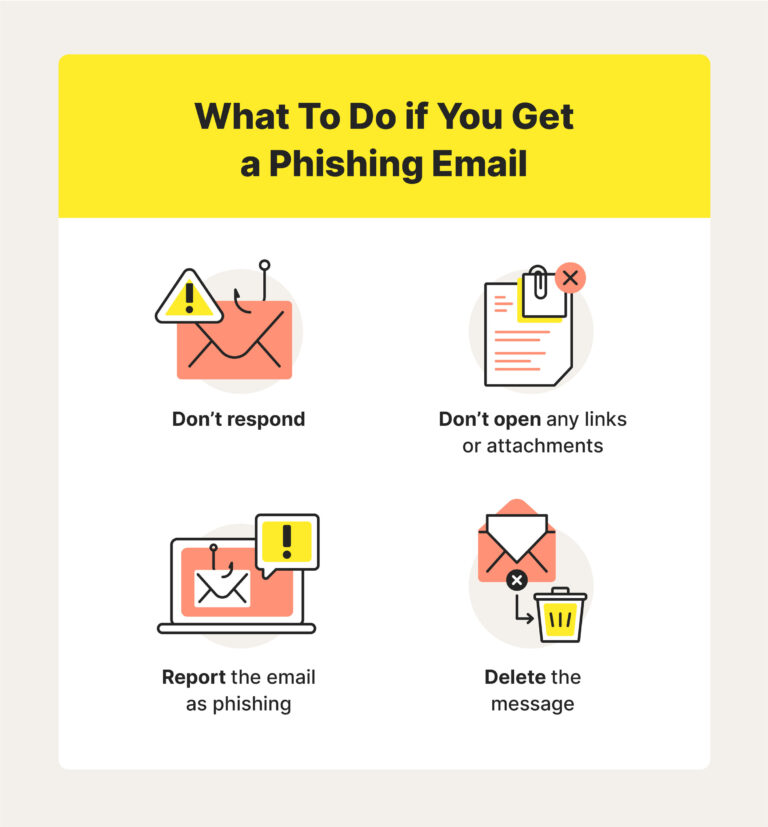
Phishing simulations are another powerful tool. Use a service that sends fake phishing emails to your team and tracks who clicks. Do not use this to shame anyone. Use it to celebrate improvement. Share the results with names hidden and focus on the learning opportunity. When someone does click, they get immediate feedback and a quick tip on what to look for next time. This turns training into a game. It is effective, surprisingly fun, and directly reinforces your policy. An employee who spots a simulated phish is far more likely to spot a real one.
Reviewing and Updating Your Policy Over Time
Your business is not frozen in time. You add new software, hire new people, and open new locations. The threats evolve too. A policy written in 2024 might not cover the risks of 2026. You need to treat the document as a living thing. That does not mean constant, exhausting revisions. It means a scheduled, calm review process that keeps the policy aligned with reality. Neglect here turns a useful tool into a liability.
When to Review and What to Look For
Set a calendar reminder to review the policy every twelve months. Do it even if nothing seems to have changed. Technology shifts under the surface. New privacy laws pass. Your insurance requirements might have tightened. The annual review is a chance to catch those changes before they become problems. Read through each section and ask whether the rules still match how your team actually works. If a rule is routinely ignored, maybe it needs to be rewritten, not just repeated louder.
Certain events should trigger an immediate update. If you adopt a major new tool, like a cloud phone system or a customer payment portal, add relevant rules right away. If you experience a security incident, even a small one, use the lessons learned to improve the policy. The document should reflect the reality of what happened and how you want it handled differently next time. This turns a negative event into a growth moment. It also shows your team and your insurers that you are paying attention.
Conclusion
Creating a cybersecurity policy for your small business might not sound exciting. But it is one of the most protective moves you can make. It tells your team what to do, keeps your clients confident, and gives you a clear head when things go sideways. The process does not require a legal degree or a massive budget. It requires a few hours of focused thought, a willingness to write plainly, and a commitment to share the rules with your people. The policy itself becomes a backbone. Something you can point to when questions come up and something that guides your decisions in quiet moments.
Do not let perfectionism stop you from starting. A simple, honest policy that covers the basics is infinitely better than no policy at all. Write the first draft this week. Share it with your team. Get their feedback. Polish it. Then sign it and start living by it. Review it once a year and after any major change. This single document, consistently maintained, can mean the difference between a minor scare and a business-ending catastrophe. The hackers are not waiting for you to feel ready. But with a clear policy in place, you are no longer the easy target they were hoping for. You have a plan. That alone puts you ahead of most small businesses out there.