
Physical Security and Cybersecurity: Why Both Matter for SMBs
There is a false sense of comfort that comes from locking the office door at night and thinking the business is safe until morning. You hear the deadbolt click into place, you set the alarm, and you drive home with a quiet mind. Meanwhile, your network router is sitting in an unlocked closet just inside that door, blinking away, and anyone who manages to get past that deadbolt can plug right into it. The divide between physical security and cybersecurity is something we invented in our heads. In the real world, they are deeply tangled together. For a small business, ignoring one while tending to the other is like putting a steel door on a house with wide-open windows. This guide is about closing those windows. It is about seeing your protection as one complete circle, not two separate lines on a checklist. And it is written for owners who want practical, affordable steps, not a stack of technical manuals.
The Invisible Thread Between the Physical and the Digital
It helps to understand how these two worlds connect before you start fixing things. When you hear about a massive data breach, the image that comes to mind is a shadowy hacker in a distant country tapping furiously at a keyboard. That does happen. But a surprising number of breaches start with something much simpler: a stolen laptop from a car, a lost smartphone left on a restaurant table, or a visitor who plugs a small device into an open network jack while pretending to wait for a meeting. Physical access is the skeleton key that makes many digital defenses irrelevant.
Consider your own business for a moment. If someone can walk into your office unchallenged, they can do more than steal a monitor. They can install a keylogger on a workstation, grab printed documents from a desk, or pop a tiny malicious gadget into a USB port that phones home with all your data. They can snap a photo of a whiteboard covered in passwords and project plans. No firewall on earth stops that. And it is not just malicious strangers. A disgruntled former employee who still has an office key, or a cleaning crew member with unsupervised access, represents a physical vulnerability that cyber tools were never designed to address.
On the flip side, a physical security system that relies on internet-connected cameras and smart locks becomes useless if your network is breached. An attacker who compromises your Wi-Fi might disable your surveillance cameras before walking right through the front door. The interdependence is total. You protect the digital to protect the physical, and you protect the physical to protect the digital. That is the mindset shift that changes everything.
Common Physical Vulnerabilities That Small Businesses Overlook
Small businesses often operate out of spaces that were not designed with security in mind. Converted houses, shared co-working suites, retail storefronts with back rooms full of inventory. These spaces have quirks, and those quirks become the cracks that trouble slips through.
Unsecured Network Equipment and Open Ports
Walk around your office right now and locate your router, your switches, and any network-attached storage devices. Are they in a locked room, or are they sitting on a shelf behind the reception desk? In many small offices, the networking gear is in plain sight, and the Ethernet ports scattered around the space are all live. That means anyone with thirty seconds alone in a hallway can plug in a laptop and be inside your internal network. The fix is not complicated. Move the equipment to a locked closet, a cabinet, or even a wall-mounted cage. Disable unused Ethernet ports in the router settings so dead jacks do not become invitations. It costs nothing and immediately closes a major entry point.
Laptops, Phones, and Portable Devices
Your employees carry more sensitive data in their backpacks than most businesses stored in entire server rooms twenty years ago. A single lost or stolen laptop can expose client files, financial records, passwords saved in browsers, and access to cloud services that are perpetually logged in. Yet many small businesses have no policy on device physical security. Laptops are left in cars overnight, phones sit on cafe tables, and portable hard drives with full backups get tossed into drawers. Full-disk encryption, automatic screen locks set to five minutes, and a clear policy that devices must never be left unattended in public go a very long way. These are not expensive technologies. They are mostly settings already built into the operating systems you use every day.
Paper, Printers, and the Forgotten Copy Room
In the rush to digitize everything, it is easy to forget how much sensitive information still lives on physical paper. Contracts, customer lists, sticky notes with passwords, printed financial statements. They pile up on desks, they sit in printer trays waiting to be picked up, and they end up in recycling bins that are not shredded. A determined snoop does not need to hack your server if they can grab a bank statement from the trash. Secure shredding bins, clean desk policies at the end of the day, and printers placed in areas where printouts are not left exposed make a quiet but significant difference. This is not glamorous security work, but it stops the kind of low-effort breach that nobody wants to admit they suffered.
The Overlap: When One Breach Opens the Door to the Other
It is useful to see how a single lapse in one domain cascades into the other. Real stories, stripped of identifying details, paint the clearest picture.
A Stolen Laptop That Became a Company-Wide Nightmare
Imagine a small architecture firm. One of their designers leaves a laptop bag in his car after a late night at the office. In the morning, the window is smashed and the bag is gone. The laptop is password-protected but not encrypted, so the thief pulls the hard drive, connects it to another machine, and reads everything. The drive contains client contracts, building plans under non-disclosure agreements, and a spreadsheet with passwords to the company’s project management portal. Within a week, the firm’s clients are receiving phishing emails tailored to their specific projects. The physical theft became a digital nightmare because basic encryption was never turned on.
The Tailgating Visitor and the Network Jack
A small marketing agency works in a shared building with a buzzer entry system. One afternoon, a man in a delivery uniform slips in behind an employee who holds the door open to be polite. He walks to an empty conference room, unplugs the desk phone, and connects a tiny device that looks like a power adapter but is actually a network backdoor. For the next month, he sits in the parking lot and accesses their internal file server over Wi-Fi, downloading client strategies and financial data. All because no one questioned a stranger in the hallway and the network jacks were wide open.
The Disconnected Camera That Missed Everything
A small retail boutique invested in high-quality security cameras after a break-in. The cameras are connected to the internet so the owner can check them from home. What the owner did not realize is that the cameras run on outdated firmware with a known vulnerability. A burglar exploits that vulnerability remotely, disables the cameras, and then physically breaks in. The very system meant to provide physical security was turned off by a digital attack, and the burglars knew exactly when the footage would go dark. This is the convergence in its most blunt form: a cyber flaw that neutralizes a physical control.
Practical, Low-Cost Physical Security Measures That Protect Your Data
The good news is that many of the most effective physical security measures are either free or very affordable. They are also refreshingly straightforward to implement.
Layered Access and the Reception Barrier
Your physical space should have layers, like an onion. The outer layer is the public area where anyone can walk in. The next layer requires a badge or a key. The innermost layer, where servers and sensitive files live, should require a separate lock and a very short list of authorized people. Even in a tiny office, you can create layers. Put a lock on the door that separates the waiting area from the work area. Put the server and networking gear in a lockable closet within that work area. A simple sign that says “Employees Only” combined with a policy of greeting visitors immediately sets a tone that strangers will be noticed. Most opportunistic intruders are looking for an easy, unchallenged path. A locked door and a friendly “Can I help you?” sends them elsewhere.
Visitor Logs, Badges, and the Challenge Culture
Many small businesses feel awkward about questioning people, but a healthy security culture makes it normal. When someone is in the office without a visitor badge, any employee should feel comfortable asking, “Hi, who are you here to see?” This is not about being rude. It is about creating an environment where tailgaters stand out. A simple visitor log at the front desk, combined with a disposable badge sticker, works wonders. It tells legitimate visitors that you run a professional, attentive operation, and it tells bad actors that they are being tracked. The log also creates a record you can cross-reference if something does go missing later.
Securing the Perimeter After Hours
Nighttime is when your physical defenses matter most. Exterior doors with deadbolts, windows with locks, motion-activated lighting, and an alarm system that is actually armed every night are the baseline. But also think about what is visible from outside. Can someone peer through a window and see computer screens with sensitive information? Blinds or window film solve that cheaply. Are backup tapes or external hard drives left on desks? Move them to a locked drawer or safe. Is your Wi-Fi signal reaching the parking lot? Maybe it should not. Lower the transmit power in your router settings if possible, or position the router away from exterior walls. A little paranoia after dark is healthy.
Bringing Cyber Defenses into the Physical Realm
The integration works both ways. Your cybersecurity toolkit can and should reinforce your physical security, and vice versa.
Network Segmentation for Physical Devices
All those smart gadgets you installed for physical safety deserve their own isolated network. Security cameras, smart locks, alarm panels, and environmental sensors should not share a network with your employee workstations and file server. If a cyber attacker compromises a camera, you do not want them to hop from that camera into your accounting system. A separate virtual network, often called a VLAN, keeps the damage contained. Many business-grade routers support this with a few clicks. Even a guest network repurposed for IoT devices is better than having everything mingled together.
Encrypting Everything, Everywhere
Encryption is the bridge that protects digital data when physical devices are lost. Turn on full-disk encryption on every laptop, desktop, and mobile device that touches business data. Most modern operating systems have this built in and just need you to flip it on. For external drives and USB sticks, use encrypted formats and set a policy that no unencrypted device should ever store client data. When a device inevitably gets lost or stolen, encryption turns a catastrophic breach into an inconvenience. You still lose the hardware, but your data remains unreadable.

Monitoring and Alerts That Span Both Worlds
Modern security cameras and access control systems can send alerts to your phone. Combine that with network monitoring that flags unusual login times. If your access card system logs someone entering the office at 2 a.m., and your network monitoring simultaneously detects a workstation logging in from that part of the building, you have a powerful correlation. Small businesses might not have a 24/7 security operations center, but even basic integrations can surface anomalies. Some managed security providers offer small-business packages that tie physical and digital alerts into a single dashboard. It sounds futuristic, but it is becoming more accessible every year.
Building a Unified Policy That Covers Both
Most small businesses have an employee handbook that touches on conduct, but few mention physical security and cybersecurity in the same chapter. A unified policy weaves them together and makes everyone’s responsibilities clear.
Clean Desk and Clear Screen Rules
A clean desk policy means that at the end of the day, all papers are filed or shredded, and no sensitive documents remain in plain sight. A clear screen policy means that computers lock automatically after a short idle time, and nobody leaves their workstation without locking the screen. These two simple rules address both physical snooping and digital exposure. They cost nothing and they become second nature within a week. The key is leadership modeling the behavior. If the owner leaves sticky notes with passwords on their monitor, the policy is just words on a page.
Device and Media Handling Procedures
Your policy should spell out exactly how devices are secured when not in use. Laptops go in locked drawers or are taken home, never left in cars. USB drives with sensitive data are encrypted and accounted for. Old hard drives and printers with internal storage are securely wiped or physically destroyed before disposal. A small business might not produce a lot of e-waste, but one discarded copier with an un-wiped hard drive can leak every document it ever scanned. Include device disposal in the policy so nobody tosses old equipment in the dumpster without thinking.
Incident Reporting That Covers Both Domains
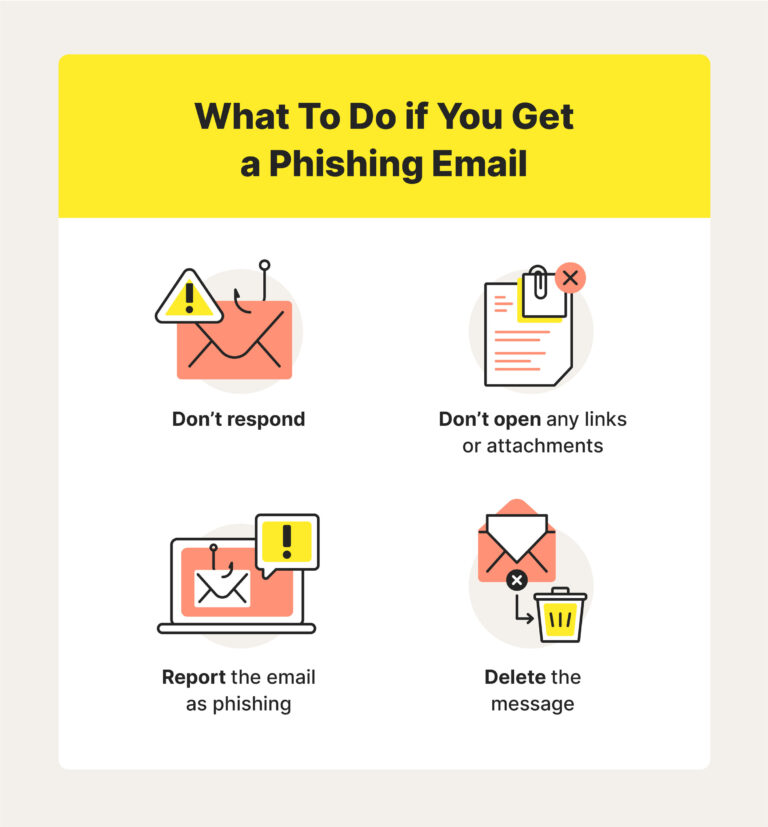
If an employee loses a company phone, they need to report it immediately, not hide it out of embarrassment. The reporting process should cover physical theft, lost devices, tailgating incidents, and suspicious visitors, right alongside phishing emails and suspicious pop-ups. When staff understand that a lost key card is a security incident just like a malware alert, the barriers between physical and digital disappear in practice, not just in theory.
Affordable Technologies That Unite Physical and Cyber Defenses
You do not need a Hollywood control room to benefit from technology that bridges the gap. A handful of accessible tools can transform your posture.
Smart Locks with Audit Trails
Traditional keys are hard to track. You never know who made a copy. Smart locks that use keypads, fobs, or phone apps provide an audit trail of exactly who entered and when. If a code is compromised, you can revoke it instantly without changing every lock. Many of these systems alert you when a door is propped open or unlocked outside of business hours. Just make sure the smart lock itself is on a segmented network and receives firmware updates. A smart lock with a known vulnerability is worse than a dumb lock.
Cloud-Based Camera Systems with Secure Storage
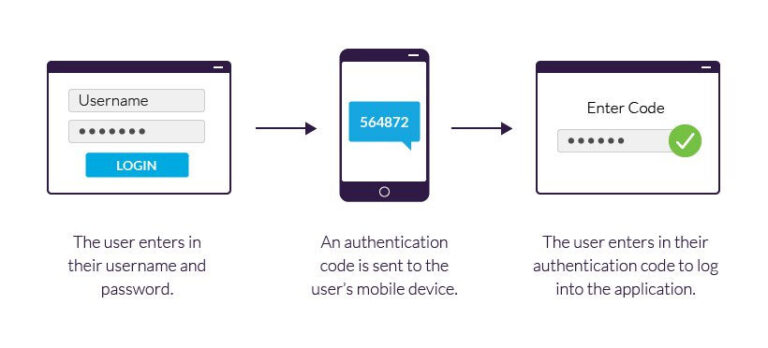
Modern security cameras do not need a clunky DVR sitting in a closet. Cloud-based systems store footage offsite with encryption, and they let you check in from anywhere. The security advantage is that even if someone steals the physical camera, the footage of them doing it is already stored safely in the cloud. Choose a provider that encrypts video both in transit and at rest, and enable multi-factor authentication on the account. That way, the camera system does not become a window for someone else to peer through.
Unified Endpoint Management for Small Fleets
Managing a dozen devices can feel chaotic. A unified endpoint management tool lets you enforce encryption, push updates, and remotely wipe a lost device from a single dashboard. These tools have come down in price dramatically, and some are built specifically for small businesses. When an employee calls on a Saturday morning to say their tablet was stolen from a coffee shop, you can wipe it in minutes from your phone. That capability directly translates a physical event into a non-event for your data.
Creating a Culture That Values Both Sides Equally
At the end of the day, security lives in the habits and attitudes of your team. Tools and policies are the skeleton. Culture is the muscle that moves them.
Lead with Stories, Not Scare Tactics
People tune out when you lecture them about threats. They lean in when you tell them a story about a business like yours that lost six months of work because someone left a door unlocked. Share real examples during team meetings, not to frighten, but to make the risk feel tangible. Emphasize the small, everyday choices that prevented a disaster in another company. When your team sees security as a set of reasonable habits rather than a paranoid fantasy, they adopt it willingly.
Recognize and Reward Vigilance
When someone questions an unfamiliar face in the hallway or reports that a filing cabinet was left unlocked, thank them publicly. Make it known that security awareness is appreciated, not annoying. A small gift card for the person who spots the quarterly phishing test reinforces that this is part of your company values. Positive reinforcement builds a team that looks out for each other and for the business.
Make It Personal
Connect security to what your team cares about. Protecting the business means protecting their jobs, their paychecks, and the clients they have grown to know. When you frame it that way, locking a computer screen feels less like a bureaucratic rule and more like taking care of your work family. The emotional connection is what sustains good habits long after the training session ends.
Conclusion
The wall we imagine between physical security and cybersecurity is a dangerous illusion. A locked door means little if your network is wide open, and the strongest firewall crumbles when someone can simply walk up and plug in a rogue device. For a small business, the integration of these two domains is not a luxury reserved for corporate giants. It is a practical, achievable goal built on simple steps that cost more attention than money. Lock up your networking equipment. Encrypt every device that leaves the building. Segment your smart gadgets from your critical data. Create a culture where questioning strangers and locking screens is as natural as saying good morning. The peace of mind that comes from knowing you have closed the obvious gaps is genuine and lasting. You stop worrying about the blurred line between the physical and the digital because you have finally treated them as the single, connected challenge they have always been.