How Hackers Exploit Weak Passwords in Small Companies
It is funny how the smallest things can cause the biggest headaches. You have probably spent countless hours picking out the right accounting software, training your team, and making sure the coffee machine works. But in the corner of all that effort sits a tiny, almost invisible detail that can bring everything crashing down: the passwords your team uses every day. I have seen business owners who thought they had decent security because they installed an antivirus and locked the office door, yet their email password was still the name of their dog followed by the year they started the company. Hackers love that. They count on it. Exploiting weak passwords is not some advanced, Hollywood-style cyberattack. It is the digital equivalent of checking every car door in a parking lot until one opens. This guide will walk you through exactly how attackers prey on bad password habits, why small companies are their favorite target, and the straightforward changes that can slam that door shut for good.
The Password Problem No One Wants to Admit
There is a quiet embarrassment around passwords. Everyone knows they should use strong, unique ones for every account, but almost nobody does it consistently. The reasons are deeply human. We want to remember things easily. We want to log in fast. We have too many accounts to count, and the mental load of managing them all is genuinely overwhelming. So we cut corners. We use the same password everywhere, or we make tiny variations like adding a number at the end, or we write them on sticky notes tucked under the keyboard. It feels harmless in the moment, just a little shortcut to get through the day.
But hackers understand these human tendencies intimately. They build their entire business model around them. They know that for every ten small businesses they scan, at least a couple will have someone using “Summer2025” or “CompanyName1” as the key to the kingdom. And they know that once they crack that one password, the same login will probably work on the email, the cloud storage, the bank portal, and the social media accounts. It is not personal. It is just math. The odds are in the hacker’s favor, and they play those odds relentlessly.
The Most Common Password Mistakes Small Businesses Keep Making
Before diving into how hackers operate, it helps to face the mistakes honestly. These are not theoretical. They show up in almost every small business I have consulted with, and they are often the things nobody talks about until after something bad happens.
Reusing Passwords Across Multiple Accounts
This is the big one. An employee sets a password for a random industry forum they signed up for years ago. That forum gets breached, and their email address and password end up in a giant database that criminals trade like baseball cards. Now the attacker tries that same email and password combination on Google Workspace, on Microsoft 365, on QuickBooks, on the company bank. And because that person reused the password everywhere, the attacker walks straight in. One forgotten, unimportant account becomes the master key to your entire operation. The truth is, reusing a password even once connects the security of your business bank account to the security of some podcast website you joined in 2019. That is a link you do not want.
Short and Predictable Passwords
Humans are predictable pattern machines. We use our kids’ names, our pets’ names, our favorite sports teams, our birthdates, and the street we grew up on. A little social media sleuthing can surface half of that in five minutes. Even without personal research, attackers use dictionaries of millions of common passwords and try them all. A password like “Mustangs1” might feel clever, but it is cracked in seconds. And adding an exclamation point at the end does not fool anyone. The automated tools know all the tricks, all the substitutions, all the common sequences. They have seen every password a human can think up while staring blankly at a screen.
Sharing Passwords in Plain Sight
In a small office, convenience often wins. The social media intern needs the Instagram login, so someone texts it to them. The bookkeeper needs access to the vendor portal, so the owner emails the password. That password now lives in a text message thread, an email inbox, and possibly a chat app, none of which are secure storage. When that intern leaves two months later, nobody thinks to change the password. And if their phone gets compromised, those plain-text messages are a gift. This casual sharing culture is not born from laziness. It is born from not having a better system in place. The good news is that a better system exists and is surprisingly easy to adopt.
Storing Passwords in Spreadsheets or Notes
I cannot count how many times I have seen a file called “passwords.xlsx” sitting on a shared drive, completely unprotected. Or a note on a phone titled “Logins” with every credential listed. These files are treasure chests. If ransomware hits, the attackers grab that spreadsheet along with everything else. If a laptop gets stolen, the thief finds a nice organized list of all your accounts. Even without a dramatic breach, an employee who is leaving might quietly copy that file on their way out. Storing passwords like this is like leaving the keys to every door in your building hanging on a hook by the entrance with labels attached.
How Hackers Actually Crack and Exploit Weak Passwords
Now that we know the mistakes, let us look at the mechanics. How do attackers turn those mistakes into real damage? The methods are not magic. They are systematic, automated, and efficient.
Brute Force Attacks: Guessing at Scale
A brute force attack is exactly what it sounds like. The attacker uses software that tries password after password, as fast as the target system allows, until it finds the right one. They do not sit there typing manually. The tool runs through millions of combinations, starting with common passwords, dictionary words, and known patterns. A weak password with six characters can be cracked in minutes. Eight characters with just lowercase letters might take a few hours. The longer and more complex the password, the more time and computing power it requires, and eventually the cost outweighs the reward. That is the entire point of a strong password: to make the math so expensive that the attacker moves on.
The scary part is that many small business services do not have strong protections against brute force. An old router, a rarely updated email server, a poorly configured remote desktop connection, all of these can be hammered with login attempts from thousands of different IP addresses simultaneously. Without rate limiting or account lockout policies in place, the attacker can guess for days without being stopped.
Credential Stuffing: The Lazy Gold Mine
Credential stuffing takes advantage of human laziness. Attackers buy massive lists of leaked username and password pairs from previous data breaches. These lists are enormous, often containing hundreds of millions of records. Then they use automated tools to try those credentials across thousands of websites, including your business email, your cloud storage, your bank. They do not need to crack anything. They just need one person in your company to have reused a password that was already leaked in some other breach. And statistically, someone has. That is the chilling reality. You can have the most secure password in the world, but if you used it on a third-party site that got hacked, it is now in a criminal database forever.
Password Spraying: A Low and Slow Approach
Password spraying is a smarter cousin of brute force. Instead of trying many passwords against one account, which triggers lockouts, the attacker tries a few very common passwords, like “Password1” or “Spring2025,” against many accounts. They might try three passwords per account, then wait a while, then try three more. This method flies under the radar of most alert systems. For a small business using a cloud service like Microsoft 365, a password spraying attack might target every employee, hoping that at least one person chose something weak. It is quiet, patient, and maddeningly effective.
Phishing for Passwords Directly
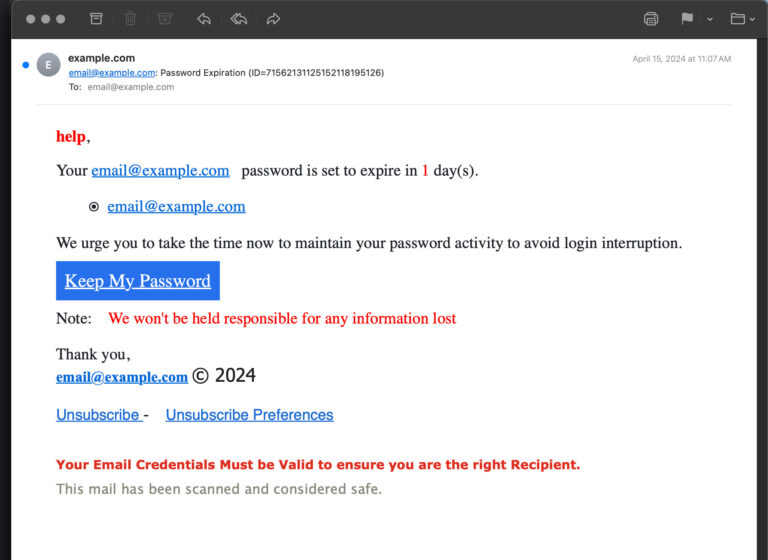
Sometimes the attacker does not even need to crack anything. They just ask for the password. A well-crafted phishing email can look exactly like a login notification from Microsoft or Google, saying the user’s account was compromised and they need to log in to verify. The link leads to a fake login page that captures the credentials. The employee types their password willingly, because the page looks completely legitimate. In a busy workday, with dozens of emails flying by, that brief moment of distraction is all it takes. This is not a failure of intelligence. It is a failure of attention, and attackers design their emails specifically to exploit that.
Social Engineering and Shoulder Surfing
Not all password theft happens over a screen. A phone call from someone pretending to be IT support, asking for a password to “run a quick diagnostic,” still works surprisingly often. An attacker might also physically watch someone type their password in a coffee shop, a co-working space, or even just through an office window. Small businesses often lack the formal verification habits that larger organizations drill into their staff. When someone sounds confident and uses the right names, people want to be helpful. The attacker leverages that natural human instinct.
The Damage One Compromised Password Can Do
A stolen password is not the end of the story. It is the beginning. The attacker now has a foothold, and they will use it to move deeper into your business.
Email Takeover: The Control Center
Your email is the hub of your digital identity. If a hacker gets into your inbox, they can reset passwords for almost every other service you use, because those reset links go straight to your email. They can send fraudulent invoices to your clients, ask your bookkeeper to change vendor payment details, and read your entire email history to understand your business relationships. They can then impersonate you with frightening accuracy, using real conversations and personal details to trick your contacts. For a small business, an email takeover can spiral into wire fraud, data theft, and reputation damage within a single afternoon.
Lateral Movement Across Your Network
Once inside one account, an attacker looks for ways to spread. They scan for shared drives, network-attached storage, and other connected systems. Maybe the compromised account has access to a folder of employee records, or a database of customer credit cards, or the administrative panel for your website. They map the network quietly, often staying dormant for weeks while they exfiltrate data. The weak password on a receptionist’s email account can become the key that unlocks your entire server room. That is the lateral movement risk, and it is one of the hardest things to detect.
Ransomware Delivery
Many ransomware attacks start not with a sophisticated exploit, but with a stolen password. The attacker gains access to a remote desktop or a cloud admin console, disables backups, and then pushes the ransomware across the network. It might begin with a small contractor account that nobody thought to secure properly. A weak, reused password on that account is all it takes. The ransom note that appears on your screens three weeks later is the final step of a process that started with a single credential being cracked or bought off a criminal forum.
Data Exfiltration and Double Extortion
Before encrypting your files, modern ransomware gangs steal a copy of everything they can access. They then threaten to publish your client data, your employee files, your internal emails, unless you pay up. A compromised password that gave access to your cloud storage could mean every contract, every design file, every piece of sensitive communication is now in the hands of criminals. The damage is not just the ransom. It is the regulatory fines, the lawsuits, and the trust you can never fully repair.
Building a Password Defense That Actually Works
The good news, and there is a lot of it, is that defending against these attacks is not complicated. It requires a few deliberate changes that cost very little and pay off enormously.
Password Managers: The Single Best Investment
A password manager is software that generates, stores, and fills in long, random, unique passwords for every account. You only need to remember one master password. Everything else is handled. For a small business, a shared team password manager means no more texting credentials, no more spreadsheets, and no more reused passwords. It can even securely share logins with employees without them ever seeing the actual password. Setting this up takes an afternoon, and it immediately eliminates the vast majority of password-related risks. It is not hyperbole to say that a password manager is the most impactful security tool a small business can adopt.
Multi-Factor Authentication: Your Safety Net
Multi-factor authentication, or MFA, adds a second step to the login process. After entering the password, the user must also provide a code from their phone, a tap on a hardware key, or a biometric scan. If a hacker steals your password, they still cannot get in without that second factor. MFA blocks over ninety-nine percent of automated credential attacks. Turn it on for email, financial accounts, cloud storage, domain management, and any other service that supports it. The tiny extra moment it adds to your login is one of the best investments of time you can make.
Passphrases Instead of Passwords
If you absolutely must memorize a password, use a passphrase. That is a string of four or five random words, maybe with a number and a symbol thrown in. Something like “correct horse battery staple” is far harder for a computer to crack than a short, complex string like “P@ssw0rd!” because length is more important than complexity in resisting brute force. A passphrase is also easier to remember. It is a practical middle ground for the master password on your password manager or the login to a device that cannot use MFA.
Password Policies That Are Actually Human
An effective password policy does not just mandate complexity. It encourages good behavior. Instead of forcing people to change passwords every month, which leads to predictable patterns like “Spring1” then “Spring2,” enforce length and uniqueness. Use a password manager to check if any credentials have appeared in known breaches. Set a minimum of twelve characters for human-created passwords. And crucially, communicate the why behind the rules. When your team understands that this is not just a bureaucratic hoop but a real defense that protects their own paychecks and the clients they care about, compliance becomes much higher.
Lockout Policies and Anomaly Detection
Configure your systems to lock an account after a certain number of failed login attempts, say ten. This stops brute force and password spraying in their tracks. Also, enable alerts for logins from unusual locations or devices. If your office is in Chicago and someone logs in from Lagos at 3 a.m., you want to know immediately. Many cloud services include these features, but they are often not turned on by default. A quick pass through your settings can activate a layer of automated surveillance that watches your back.
Creating a Password-Secure Culture in Your Small Company
Technology alone is not enough. The people in your business need to see password security as part of their job, not an annoying obstacle.
Training That Feels Real
Skip the dry compliance videos. Instead, gather your team for a brief, honest conversation. Show them a real example of a credential stuffing attack. Explain how a reused password from a personal account can open the door to the company bank. Make the connection to their own lives, their own paychecks, their own sense of safety. When the training feels personal and relatable, it sticks. Do this once a quarter, not as a lecture, but as a team check-in. The tone should be supportive, not scary.
Making It Safe to Report Mistakes
If an employee clicks a phishing link that captures their password, or realizes they have been reusing a password across accounts, you want them to tell you immediately. Fear kills communication. A policy that says no one will be punished for reporting a security slip-up, and a culture that actually enforces that policy, will save you countless times. When a mistake surfaces quickly, you can reset the password and check for damage before things spiral. When it is hidden in shame, it festers.
Modeling Good Habits at the Top
The owner and managers must use the password manager. They must turn on MFA. They must never send a password in a plain email and ask someone else to handle it. When leadership takes these habits seriously, the rest of the team follows naturally. When leadership cuts corners, it sends an unspoken message that all of this is optional. Culture flows downhill, and in a small business, that hill is very short. Your example matters enormously.
Conclusion
Weak passwords are not a minor inconvenience. They are the wide-open front gate that hackers walk through every single day, and small businesses have a target painted on their backs precisely because the gate is so often left unlatched. The attack methods are automated, relentless, and smart enough to exploit every human shortcut we take. But the defenses are not complicated. A password manager wipes out reuse and sticky notes in one stroke. Multi-factor authentication blocks the stolen credentials that slip through. Passphrases make memorized logins actually secure. And a workplace culture that treats password safety as a shared responsibility turns every employee into a gatekeeper instead of a weak link. The time and money required to make these changes are shockingly small compared to the cost of a single breach. You do not need to be perfect. You just need to be harder to hit than the next business on the list, and right now, that bar is so low that a few honest conversations and a couple of software installations will vault you far ahead of the pack. The peace of mind waiting on the other side is real, and it is yours for the taking.